
Use the Claude Wisely, One Piece is Enough


Original Article Title: everything claude has shipped in 2026 and how to actually use it
Original Author: @kloss_xyz
Translation: Peggy, BlockBeats
Editor's Note: As we look back at Claude's product evolution in 2026, we'll notice a significant change: the question is no longer "what it can do," but rather "how different people should use it."
This article, based on Anthropic's product updates since 2026, systematically analyzes Claude's capabilities and usage. The article is organized according to the logic of "what different people should use, how to use it in different scenarios." You can think of it as a guide: when facing specific tasks, you can quickly locate the corresponding module and invoke the appropriate capability.
For first-time users of Claude, it is necessary to first understand the model and basic capabilities, including context window, model hierarchy, and the four usage modes. These factors together determine Claude's capability boundaries and form the foundation for subsequent usage.
For knowledge workers, the focus is on the task execution system represented by Cowork. How to build a workspace, create context files, set global commands, and reshape interaction through AskUserQuestion determine whether you are "using AI" or "making AI work."
For developers, the core path unfolds through Claude Code. The key is no longer writing code itself, but how to build a reusable, collaborative development system through mechanisms like CLAUDE.md, Rules, Commands, Skills, and Agents, making Claude part of the software production process.
At a more specific application level, from data analysis and presentation in Excel and PowerPoint to APIs, automated processes, and visualization capabilities, Claude is gradually integrating into the traditional software system, becoming a fundamental part of its capabilities.
As AI transitions from a "conversation tool" to a "work system," the true difference no longer comes from the model itself but from how you use it.
Below is the original text:
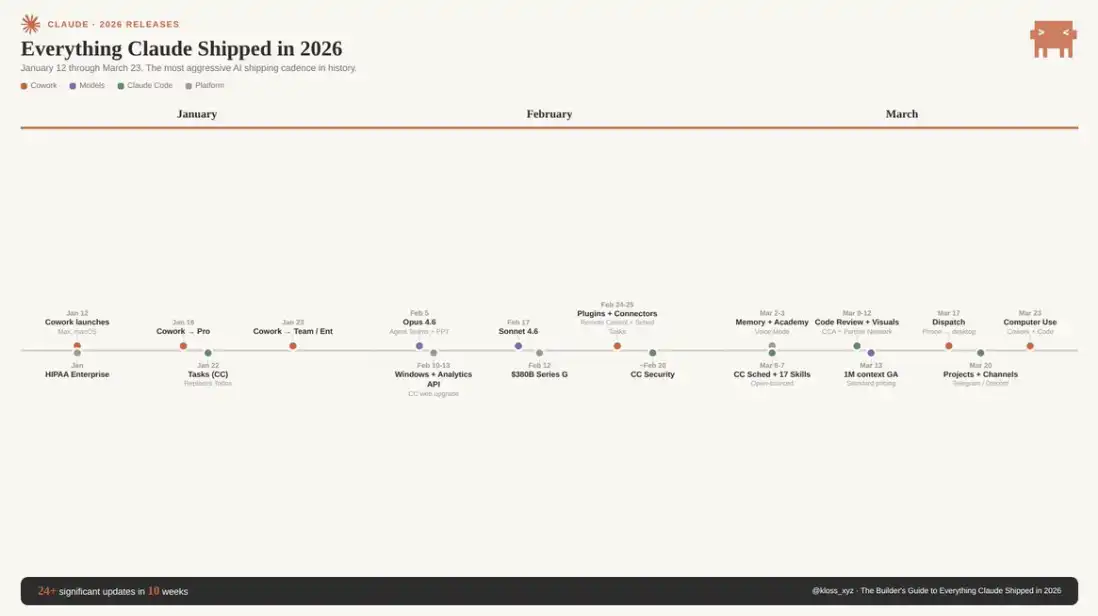
Anthropic's recent product update cadence has been unbelievably fast, to the point where even many power users are struggling to keep up. There's almost a new release every day, and since January of this year, major version updates have been occurring roughly every two weeks. New models, tools, integrations, and even entirely new product categories are constantly being rolled out. If you zone out for a bit or take a few weeks off, you've likely missed out on quite a few key changes. And indeed, Claude is truly reshaping how you work—there's no doubt about that.
This is a "Comprehensive Guide". As of March 23, 2026, this document covers all of Claude's already live key features: including how each feature is set up, when to use it, and truly effective best practices. Understanding these distinctions is the key difference between "feeling cool" and "truly restructuring how work gets done".
You will likely want to bookmark this content for repeated viewing. Feel free to share it with your team or friends. This is exactly the kind of reference manual I wished someone had put together when I first started.
Models and Core Capabilities: What Claude "Can Do"
The Claude 4.6 series is currently divided into three model tiers. Below are the capability boundaries of each model and their use cases:
Claude Opus 4.6 is the current performance ceiling. Released on February 5, 2026, it supports a 1 million-token context window (further details on price-adjusted context). Under the 1 million-token long context, the MRCR v2 score is 78.3%, the highest-performing among current peer models.
In the fields of Law, Finance, and Programming, among others, it leads comprehensively. Anthropic reports its task completion capability can reach 14.5 hours, the longest among cutting-edge models. API pricing is $5 per million tokens input / $25 output, with a maximum output of 128K tokens. It supports adaptive reasoning and introduces the "max" level for unleashing peak performance.
Note: The MRCR v2 score is a measure of the model's ability to "retrieve correct information in ultra-long contexts."
· Use Cases (Opus): Complex large-scale context analysis, codebase refactoring, deep research, high-stakes delivery, serious content production, and all tasks where "quality is prioritized over cost".
· Non-Use Cases (Opus): Any workflow requiring high-frequency calls. Based on current pricing, an intensive Opus use case could consume $50–100 per day. Sonnet should be the default choice, with Opus upgrade only when Sonnet output quality is insufficient.
Claude Sonnet 4.6 released on February 17, just 12 days after Opus, is the default choice for most users. Also supporting a 1 million token context (formally available from March 13). It sees advancements in coding, computational operations, long-context reasoning, agent planning, knowledge work, and design. In early tests, about 70% of users preferred Sonnet 4.6 (compared to 4.5), even surpassing the prior flagship Opus 4.5 in 59% of scenarios.
Available on claude.ai as the default model for Free and Pro users. API pricing is $3 / $15 per million tokens, with a maximum output of 64K tokens, providing a speed boost of approximately 30–50% compared to 4.5.
· Use Case (Sonnet): Daily work, quick draft, regular programming tasks, Agent workflows — balancing speed and intelligence. In many office scenarios, its performance has approached or even surpassed Opus (in Anthropic's OfficeQA benchmark, it even leads in some tasks), while costing about 40% less.
Claude Haiku 4.5 is a low-cost, high-speed model designed for high-concurrency scenarios, mainly used for API pipelines or subagent tasks, such as read-only processing work.
But there is one important caveat: Haiku lacks any prompt-injection defense capability. If you use it in an Agent system to process untrusted input, you must carefully assess the risk and read the official documentation.
1 Million Context Window: Pricing Structure Change
Previously, requests exceeding 200K tokens required a premium fee (Opus pricing could reach $10 / $37.5 per million tokens). However, starting on March 13, this premium has been entirely eliminated. Now, the unit price for 900K tokens and 9K tokens is exactly the same. No multiplier, no hidden conditions, and no beta header required anymore.
What does this mean? Approximately 750,000 words of context can be loaded at once: the entire codebase, complete legal contracts, large-scale datasets, months of document records, all stored in the same "working memory."
At the same time, multimodal capabilities have also been enhanced, with support for up to 600 images or PDF pages in a single request (previously 100, a 6x increase). Currently available on the Claude Platform, Microsoft Foundry, and Google Cloud Vertex AI.
For teams, this shift is very direct: content that previously required chunking, summarization pipelines, and rolling context management can now be loaded all at once. Some companies have even reported that increasing the context from 200K to 500K has resulted in lower total token consumption because the model no longer needs to repeatedly read and reprocess historical information.
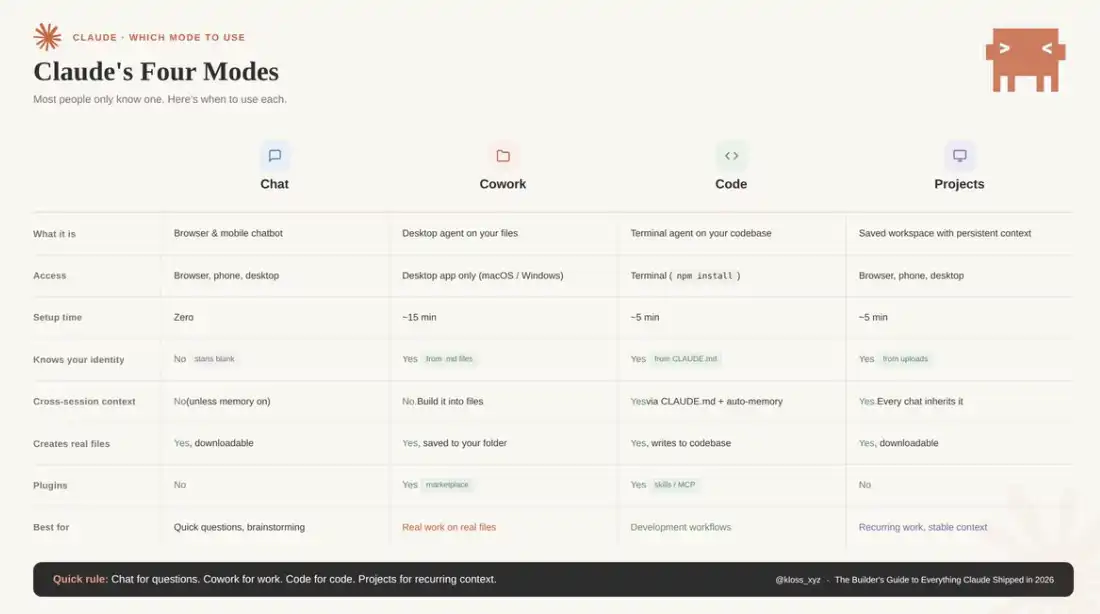
Four Usage Modes of Claude: When to Use Which One
Claude offers four modes, but most people have only used one:
Chat
Your familiar browser/mobile interface. Suitable for asking questions, brainstorming, drafting.
Each conversation starts from scratch, and you are always leading the process.
Cowork
Desktop Agent. Can directly read and modify your local files, automatically perform multi-step tasks, and output the completed results to your folder.
Suitable for "handing off tasks" rather than back-and-forth conversations.
Code
Developer mode, running in the terminal. Can access code repositories, write code, execute commands, manage Git.
If you code, this is the most powerful place.
Projects
Persistent workspace. You only need to upload files and instructions once, and each new conversation will automatically carry the full context.
Suitable for repetitive work, such as weekly reports, newsletters, client deliveries, etc.
A simple heuristic: Chat for quick questions, Cowork for AI assistance, Code for development tasks, Projects for stable contextual repetitive work
Memory and Personalization
As of March 2, 2026, Claude has opened up its memory feature based on chat history to all users (including free users). Claude extracts relevant context from your conversations and generates a memory summary that can be used across sessions. You can view, edit, or delete these memories in Settings > Capabilities. Additionally, full memory data import and export are supported—whether for pre-adjustment backup or migration to a new account, it's convenient. If you engage in Incognito conversations, the corresponding content will not be included in the memory.
The key action here is: Go to Settings > Memory now to see what Claude has "remembered." Correct or update any inaccurate or outdated information and provide the context it should know. The more accurate your memory, the less you will need to repeat yourself in future conversations.
It is important to note that sessions in Cowork mode do not inherit memory between them. If you need continuous context, you will need to compensate for this with a "context file" (as detailed in the Limitations section below).
How to Make the Most of Cowork: Aimed at Knowledge Workers
Cowork can be said to have completely changed the game. It was launched on January 12 on macOS in a research preview form (targeting Claude Max users), then expanded to Pro users on January 16, Team and Enterprise on January 23, and later released a Windows version. The market's response was very direct—investors quickly realized what this meant, SaaS company valuations evaporated by billions of dollars in just a few days, and Wall Street understood this path.
But the key is: don't treat it as just a chat interface.
Cowork is fundamentally about task delegation.
You only need to describe "what the end result looks like," Claude will automatically formulate a plan, break down subtasks, autonomously execute in your actual computer environment, and deliver the final completed file to your folder. You can just leave directly and when you come back, the work is done.
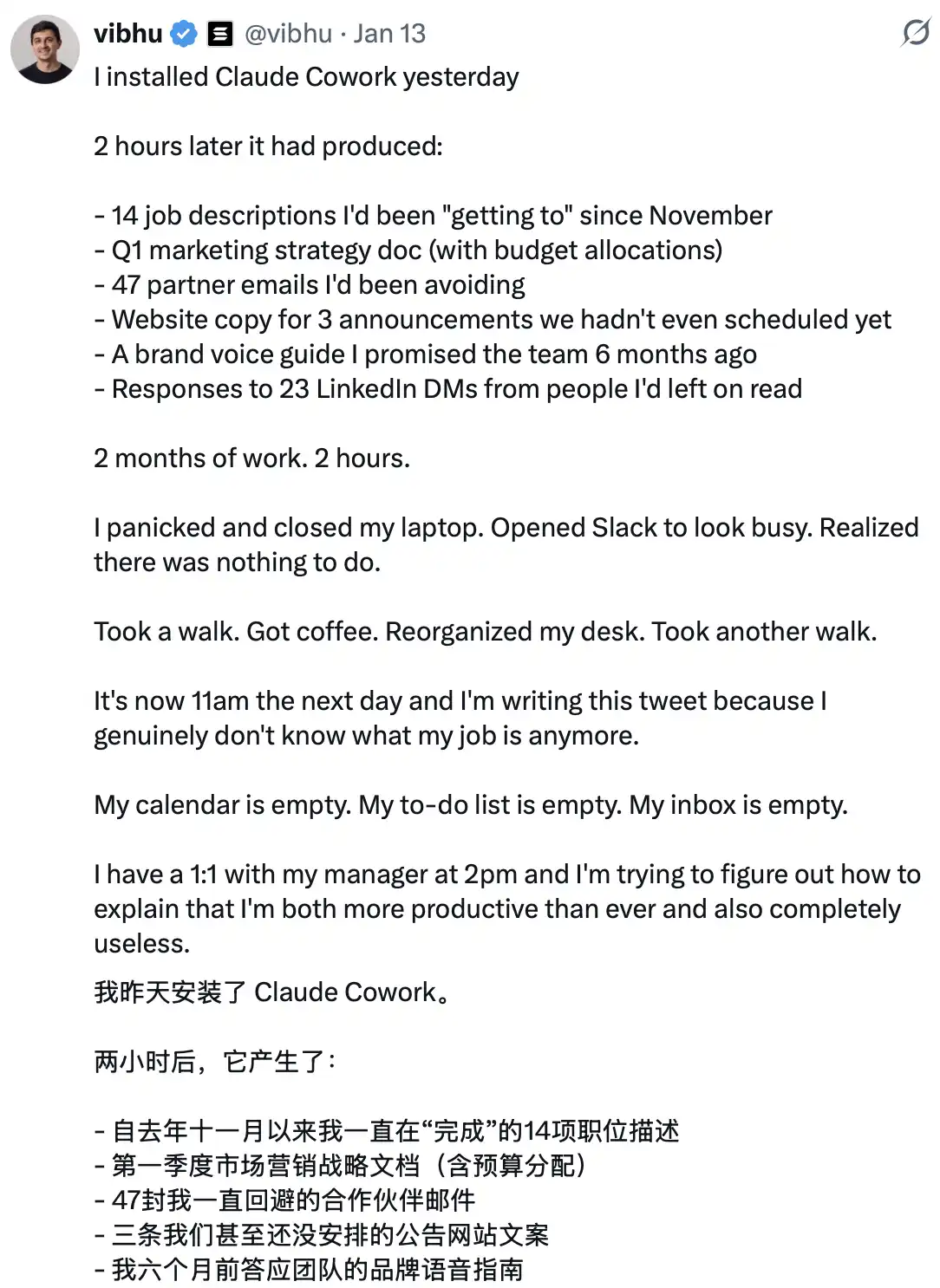
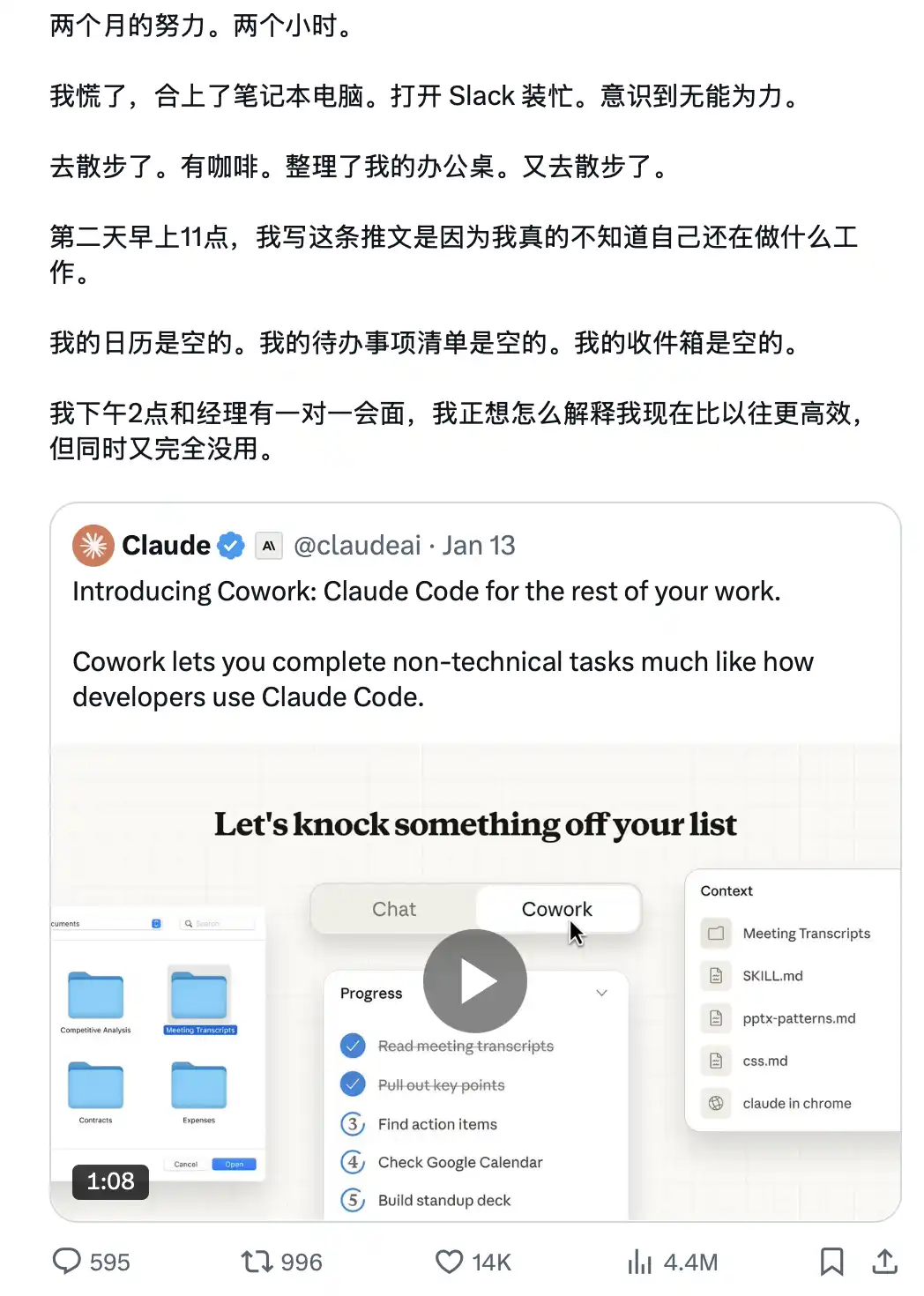
In about 10 days, Anthropic built Cowork using only Claude Code.
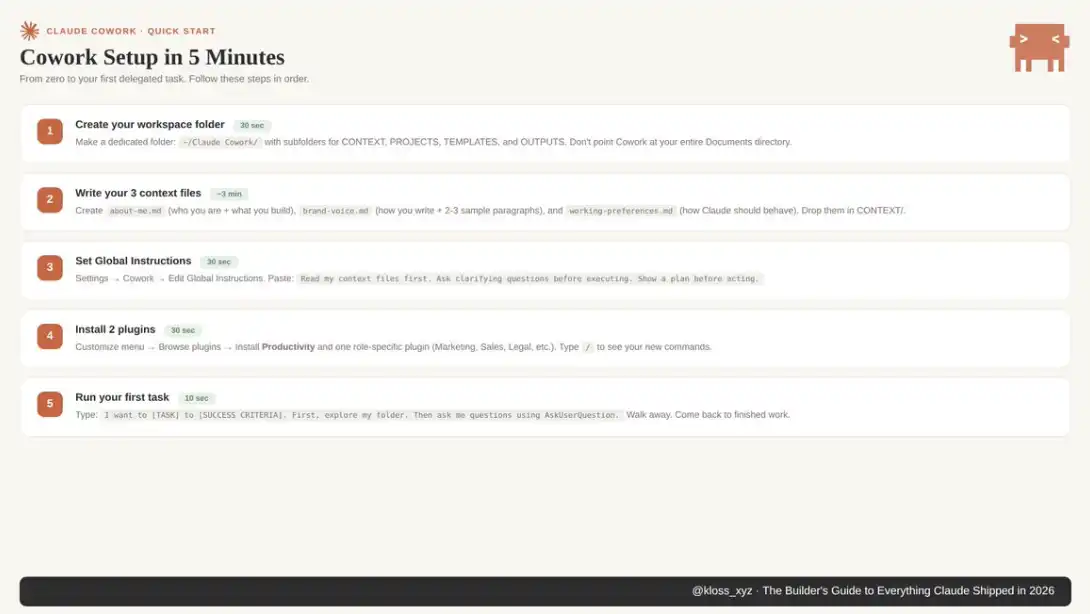
Four-Step Environment Setup: Zero-configuration Setup of Your Cowork Workflow
Those who don't use Cowork well are often still using old habits: writing long, detailed prompt words for each task, with unstable results.
On the other hand, those who truly understand it are doing something else: spending an afternoon setting up the "context environment" (including context files, global commands, folder structure), and then using only 10 words of prompts to deliver results directly to the client.
The logic behind this is:
ChatGPT trains you to write better prompt words
Cowork rewards you for building a better "file system"
The former is a skill that will depreciate as the model evolves, while the latter is an ability that will continuously compound.
Step 1: Set up Your Workspace Folder
Create a folder on your computer specifically for Cowork.
Do not point it directly to the entire Documents directory. If something goes wrong (which is possible), you want to contain the impact. Cowork has real read-write access to the folder you authorize.
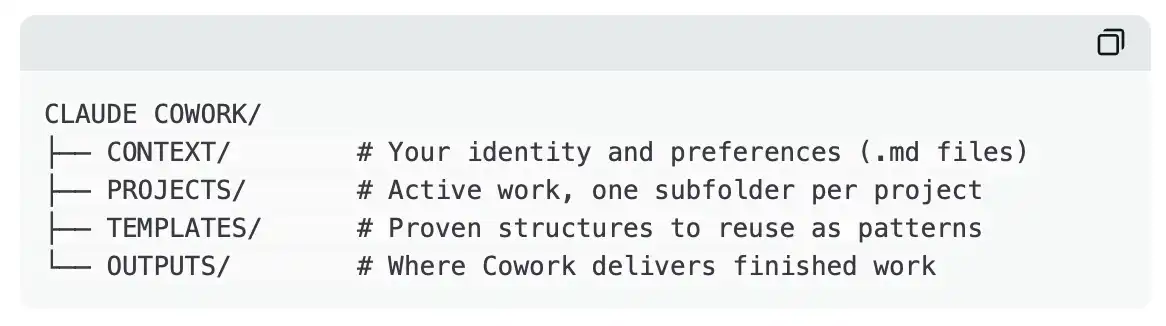
This approach helps maintain a clear structure and limits Claude's access. Almost all advanced users' practices eventually converge to a similar foundation. The folder's name is not important; the key is to ensure proper layering and isolation.
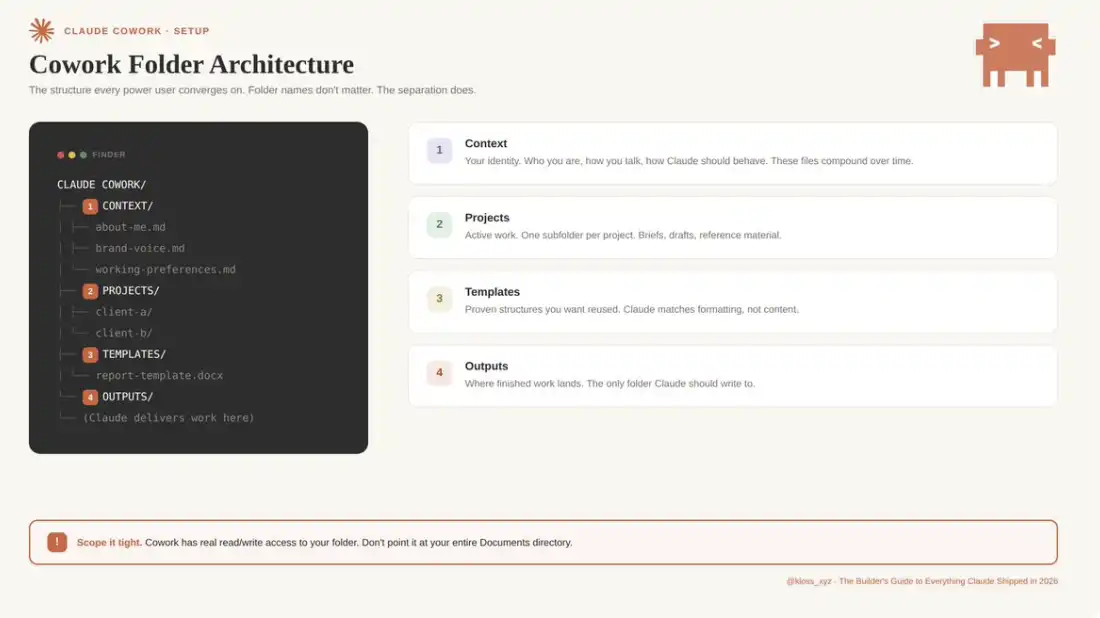
Step 2: Build Your Context File System
This is a key step in addressing "AI Output Homogenization." In your CONTEXT folder, create three Markdown files:
about-me.md
Used to define your role and current work focus. This is not a resume but a reflection of your daily work, including who you serve, current priorities, tasks of most business value. You can also include one to two representative achievements as references for your capabilities and standards.
brand-voice.md
Used to solidify your expressive style, including tone characteristics, commonly used and prohibited vocabulary, formatting preferences, and 2–3 real writing samples. This is a key differentiator between "generic AI content" and "output with a personal style."
working-preferences.md
Used to clearly define Claude's execution standards. For example: clarify questions before execution, propose task breakdown before output, no deletion operations without confirmation, default output format, quality standards, behaviors to avoid, etc.
These three files can quickly address the "cold start" issue: the lack of context requires re-explanation for each task. Once the setup is complete, Claude will have a full understanding of your style, standards, and preferences at the start of each session.
An often overlooked key point is that these context files have a "compounding effect." It is recommended to continuously iterate and optimize on a weekly basis. When Claude's output does not meet expectations, the first step is to determine whether it's a prompting issue or a context issue. In the vast majority of cases, the problem arises from the context. The solution path is also straightforward: add a rule in the corresponding file to establish a long-term effective correction mechanism.
In practice, the setup cost of this system is extremely low: I spent about 45 minutes completing the initial construction of the context folder—three .md files that define "Who I Am," "What I'm Doing," and "Claude's Execution Style." Building on this, the next time, with just a 10-word project briefing prompt, the output met the desired standard upon initial generation. Prior to this, each task required a full re-explanation of the entire work background and requirements.
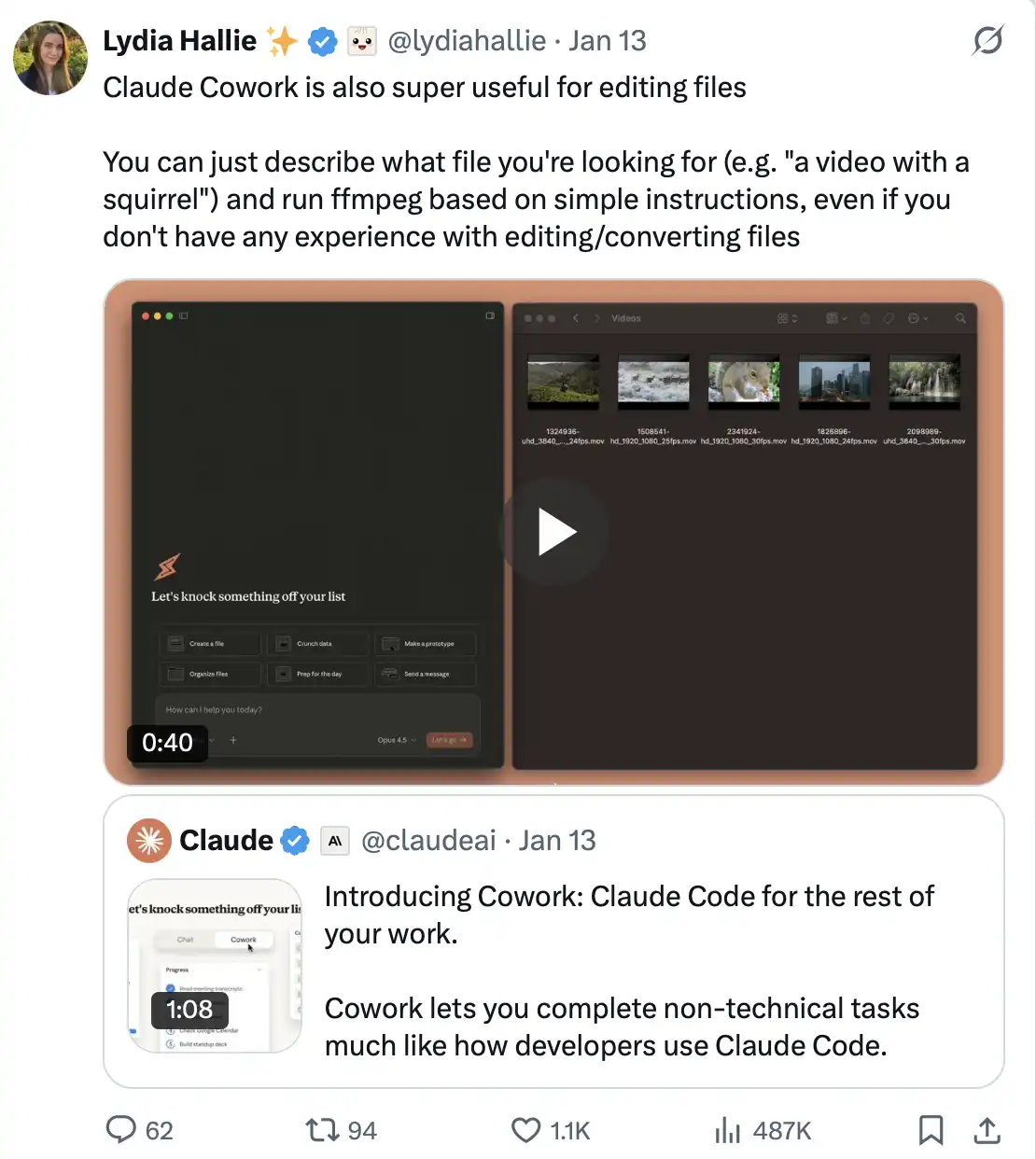
A user noted, "Claude Cowork is equally practical in file handling and editing. You only need to describe the file you are looking for in natural language (e.g., 'a video with a squirrel'), then provide simple operational instructions, and Claude can use ffmpeg to process it. Even without any experience in file editing or format conversion, you can easily complete the operation."
Step 3: Set Global Instructions
Go to Settings > Cowork > Edit Global Instructions.
Global instructions load before everything—before your files, before prompt words, and even before Claude reads your folder. They define the "underlying behavioral norms" that each session will follow.
Below is a template that can serve as a starting point:
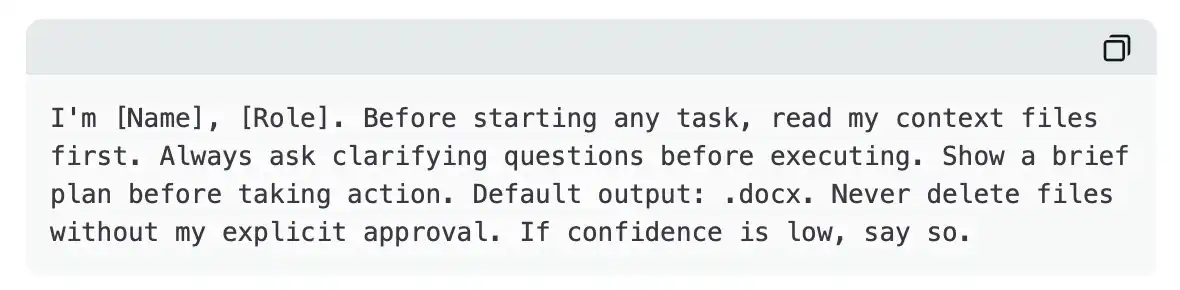
This means that even the most casual, rushed prompt words can produce calibrated results. Claude always knows who you are, always prioritizes reading the correct files, always confirms before making a judgment. The prompt words themselves only need to be responsible for the specific task at hand.
Step 4: Learn to Use AskUserQuestion
This feature fundamentally changes the entire interaction paradigm. It's no longer about you designing the "perfect prompt words," but about Claude designing the "perfect question." When you include "Start by using AskUserQuestion" in any prompt, Cowork will automatically generate an interactive form: including multiple-choice questions, clickable options, clear alternative paths, and a structured set of question frameworks to help you clarify the real requirements before execution.
The result is that you no longer need to write lengthy, finely crafted prompt words from scratch; instead, Claude takes the initiative to determine what information it needs. If the first round of questions still does not align with the requirements, you can directly point out the issue, and it will generate a new round of questions for continuous iteration.
A generic prompt template that works for almost all scenarios:
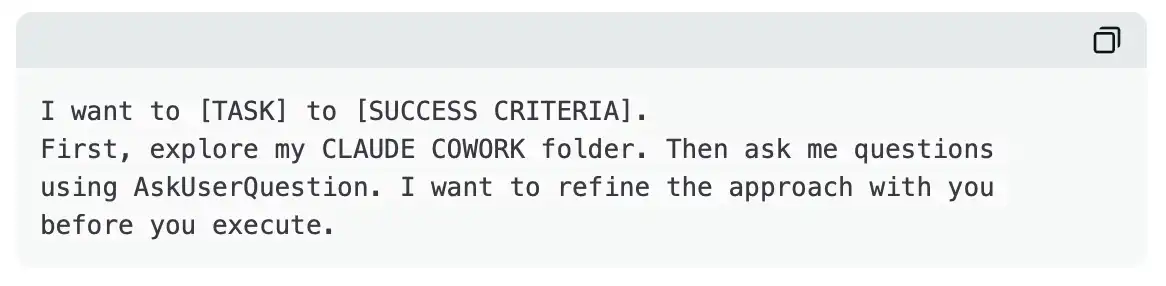
It's that simple. This template, combined with your contextual file system, can basically cover 80% of use cases. The workflow always remains consistent, with the only variable being the context itself.
Cowork Core Feature
Connectors
Live on February 24th.
Claude Cowork already supports connecting various tools such as Google Drive, Gmail, DocuSign, FactSet, Google Calendar, Slack, and more, all introduced with the Enterprise Edition update.
These are not superficial integrations. Claude can autonomously perform the following actions:
· Retrieve and browse files in your Drive
· Extract and integrate data from multiple sources
· Automatically draft emails based on retrieved information
· Scan contracts and flag potential risks
Once the connection is established, Claude can directly access real-time data from these tools in every session, without the need for copy-pasting, screenshots, or manual downloads.
Setup path: Go to Settings > Connectors, browse the directory (currently with 50+ integrations), click on "Add," and complete the authorization.
This setup is a one-time task. Connectors are open to all users for free (including the Free Edition starting February 24th), but it remains one of the most underrated features in Cowork currently.
Example of typical use:
· After connecting Slack: "Retrieve my Slack messages from the past 7 days, summarize the action items that need follow-up, and sort them by urgency."
· After connecting Google Drive: "Find the latest document in my Drive related to a particular project, read it, and summarize the top three things I need to focus on."
·After connecting Google Calendar: "View my schedule for this week, identify conflicting meetings, and generate a rescheduling email for the lowest-priority one."
Plugins and Marketplace
Launch Date: February 24.
Plugins are pre-built functional modules for specific roles, bundling skills, slash commands, and connectors into "role-based toolsets." Anthropic has released official plugins covering various areas such as sales, marketing, legal, finance, data analysis, product management, customer support, enterprise search, engineering, human resources, operations, design, branding, and life science research.
Installation: Go to the left sidebar Customize > Browse plugins, click install; type "/" in the chat to view available commands.
Recommended plugins to install first:
·Productivity
Manage tasks, schedules, and daily workflows. Type /productivity:start, and Claude will automatically organize your daily agenda.
·Data Analysis
Upload a CSV file, type /data:explore, and Claude will automatically analyze the fields, detect anomalies, provide analysis suggestions, and generate SQL in natural language.
Then choose a role plugin that matches your work:
/marketing:draft-content: Generate content based on brand tone
/sales:call-prep: Research clients and prepare talking points
/legal:review: Review contracts and flag risky terms
For team users: You can build a private plugin marketplace, internally distribute custom plugins across the organization, and control them via admin permissions (available for Team and Enterprise plans). One-time build, scalable deployment within the team.
Additionally, Anthropic has launched a public plugin marketplace and an Ambassador program, supporting community-developed plugins, with the ecosystem rapidly expanding.
Plugins can also be further personalized: After installation, you can directly tell Claude, "Customize this plugin for me based on my company's situation." Claude will ask about your workflow, terminology, and preferences, using this information as the long-term context for that plugin.
This means that a general-purpose sales plugin could evolve into a specialized tool that truly understands your Ideal Customer Profile (ICP), pricing structure, and communication style.
Scheduled Tasks
Release Date: February 25.
All you need to do is set it up once, and Claude will automatically perform tasks on a schedule, such as:
· Daily morning email summaries
· Weekly Friday data metric summaries
· Regular competitive intelligence analyses
This is assuming your computer is on and running Claude Desktop.
A real-world scenario validated by multiple power users:
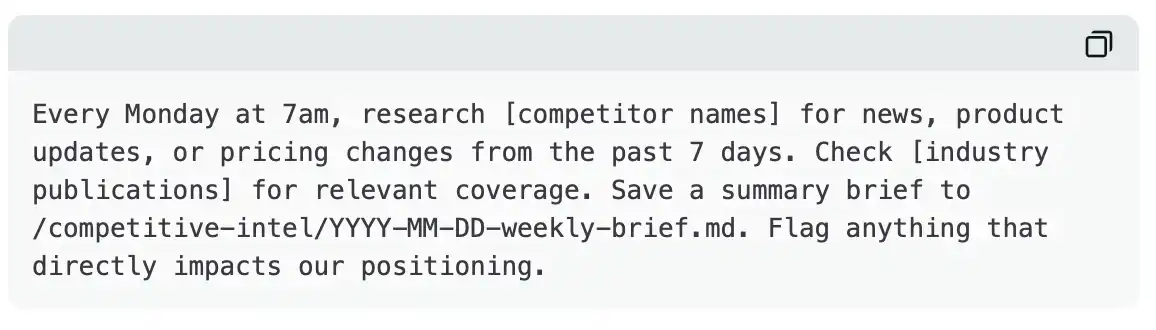
When you wake up on Monday morning, a curated brief is already waiting for you to read. With the use of connectors, scheduled tasks truly have the ability to "automate.” For example: “Every Monday, fetch all unread Slack messages from the #product-feedback channel, categorize them by topic, and generate a summary in Google Drive.”—The scheduled task automatically triggers, the connector pulls real-time data, Claude processes it, and the results appear directly in your folder.
Personally, I run 3–4 scheduled tasks every day: generating an AI news brief in the morning and saving it to the content folder; grabbing X and product release information at noon for a competitive analysis round; organizing community updates from Discord and Telegram in the afternoon; and conducting a content performance retrospective in the evening.
Each task saves 20–30 minutes of manual operation, adding up to nearly two extra hours of productive time each day, with almost zero additional management cost.
This feature also comes with the launch of the new Customize module in Claude Desktop, which integrates skills, plugins, and connectors into a single entry point.
Dispatch
Release Date: March 17.
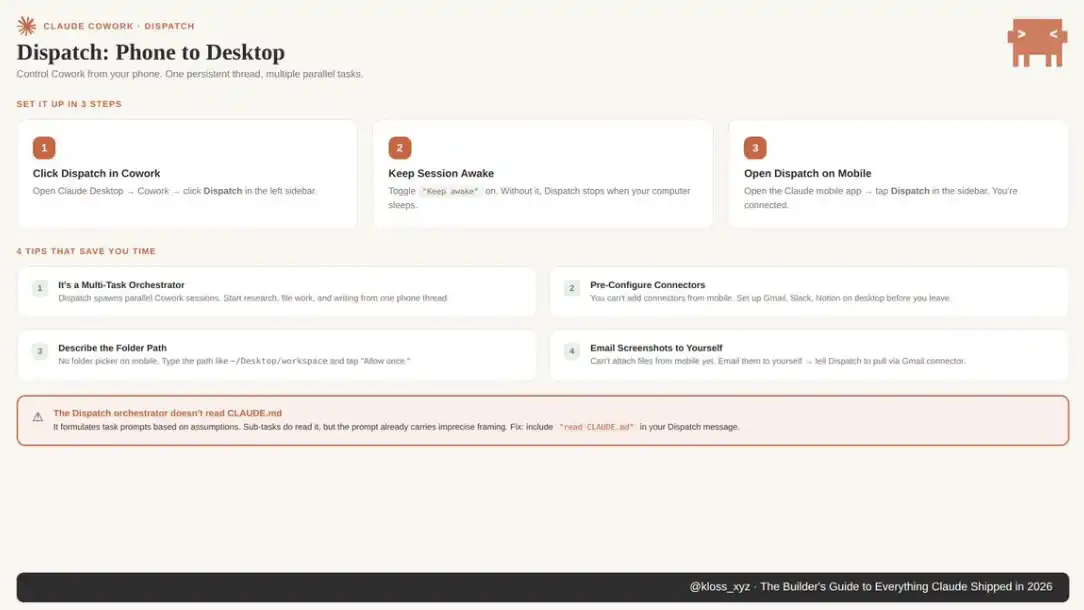
This is a bridging capability between mobile and desktop, currently available to Pro and Max users. Through Claude Desktop or the iOS/Android mobile app, you can remotely manage tasks in Cowork from any scenario.
The setup process is very simple: in Claude Desktop, enter Cowork, click on the Dispatch sidebar, and enable "Keep awake" (otherwise tasks will be interrupted when the computer goes to sleep). Then open the Claude app on your phone, click on Dispatch in the sidebar.
The core experience is: a cross-device continuously synced conversation thread. You're on your commute, using your phone to have Claude handle tasks on your desktop, such as organizing three spreadsheets to generate a report; by the time you get to the office, the results are ready. You can even stack multiple tasks in a single Dispatch command, and Claude will execute them sequentially while you're away.
An easily overlooked detail by most people (from the Product Compass guide): the Dispatch scheduling layer does not read your CLAUDE.md; it generates task prompts based on default assumptions. Although subtasks will be read, the initial command may already have deviations.
The solution is: explicitly include a line in the Dispatch command: "read CLAUDE.md".
Usage limitations and workarounds:
Cannot add connectors on mobile
→ Need to set up Gmail, Slack, Notion, and other connectors on the desktop in advance, and Dispatch will automatically inherit them.
Cannot upload files on mobile
→ Solution: send the file to your email, then have Claude read it through the Gmail connector.
Overall, Dispatch fundamentally extends "local work capability" to any time and space. It is not just remote control but rather a reshaping of the temporal boundaries of task execution.
Projects
Launch Date: March 20.
Organize related tasks into persistent workspaces, where each project has separate files, links, commands, and memory. You can import existing folders or start from scratch. This means you can manage multiple projects simultaneously, such as "Q1 Financial Report" and "Product Launch Materials," and Claude will remember the context for each.
The significance of Projects is: to elevate Cowork from a one-time Agent session to an evolving workspace. This is particularly crucial for research-intensive tasks because you no longer need to repeatedly lose context and re-explain goals between different conversations.
Computer Use
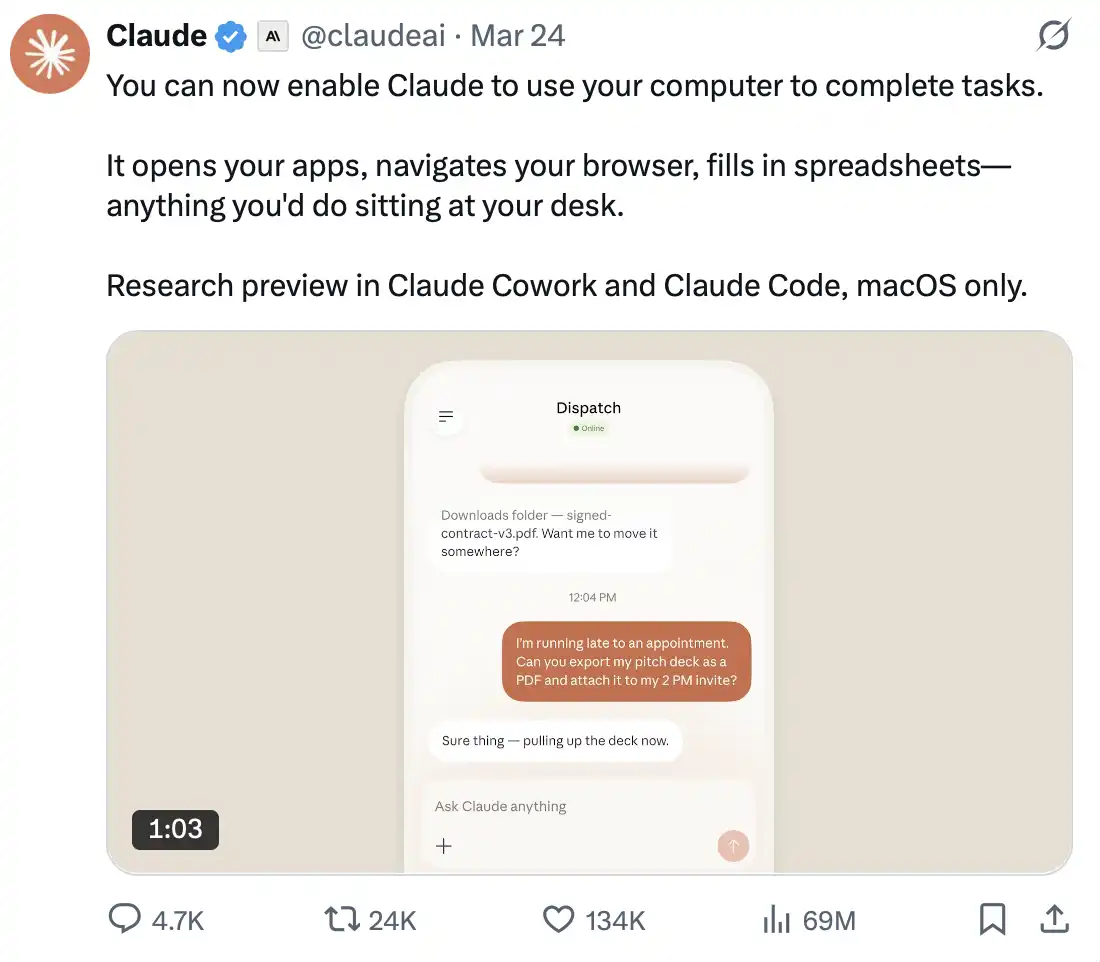
Launch Date: March 23
Currently in research preview phase, only supporting macOS, targeting Pro and Max users, and accessible in Cowork and Claude Code.
Claude can now interact directly with your computer: clicking, typing, navigating interfaces, opening apps, using the browser, filling out forms, operating any local tool.
When an official connector exists (e.g., Slack or Google Calendar), Claude will prioritize API calls; when a connector is not available, it will interact through "mouse + keyboard."
Usage Mechanism and Risk Warning
Claude requests authorization before executing critical operations. However, Anthropic still recommends avoiding handling sensitive information in this mode.
The key risk to watch out for is prompt injection based on screen content. If Claude opens an untrusted website, the page's content enters the context window, potentially affecting model behavior.
Recommendation: Only use in a trusted app and known website environment.
Integration with Dispatch
When Computer Use is combined with Dispatch, the capabilities are further expanded: you can command Claude on your phone to perform a task that requires desktop operation, browser usage, or an app that is not yet connected.
Essentially, this bridges a critical capability boundary: transitioning from "calling tools" to "directly operating the system."
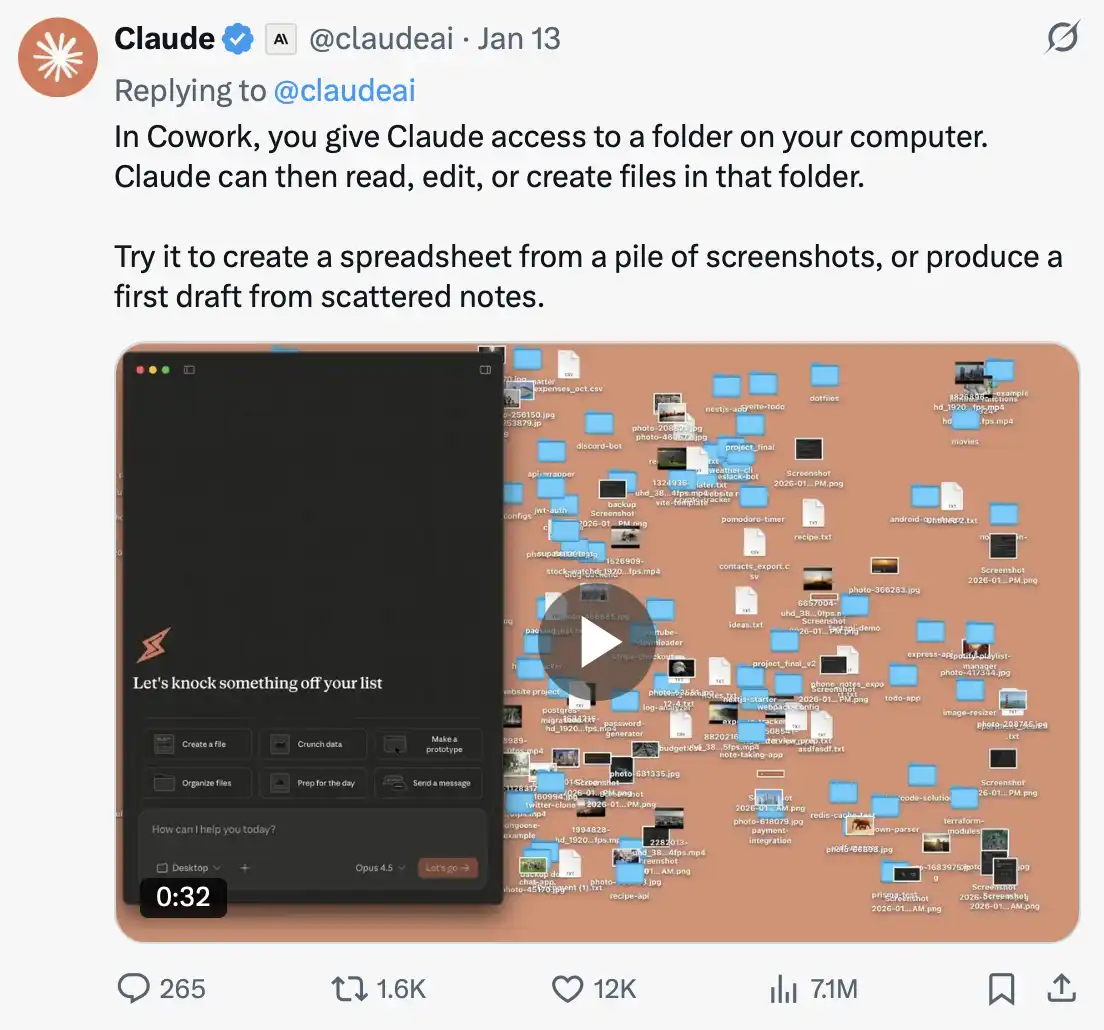
Claude in Chrome
The Chrome extension allows Claude to interact with your browser concurrently: reading web pages, clicking elements, filling out forms, and completing page navigation.
But what most people overlook is the following capability: you can teach Claude to replicate an operation flow by demonstrating it once. Any browser task repeated more than twice a week can be recorded as a workflow.
The integration with Claude Code further streamlines the development process: you can write code in the terminal and simultaneously test it in the browser in real time. The extension can read console errors, network requests, and DOM states, so when your frontend has an issue, Claude often identifies the cause before you even ask.
Additionally, you can directly control browser actions in Claude Desktop without having to switch windows frequently. For Team and Enterprise users, administrators can manage extensions at the organization level, controlling access to websites through whitelisting and blacklisting.
A typical use case is recording the process of "weekly competitive pricing page review" as a workflow. Claude will automatically visit various websites, fetch price information, and organize it into a comparison table in the Cowork folder. A task that originally took 45 minutes of repetitive clicking can be reduced to a single click for reuse.
It is important to note that you should authorize website access with caution. Web content is one of the main entry points for prompt injection, so it should be limited to trusted sites as much as possible.
Use Case
Organizing files accumulated over the past few months:
Point Cowork to a folder containing the last 6 months of miscellaneous files—including receipts, contracts, notes, screenshots, and more.
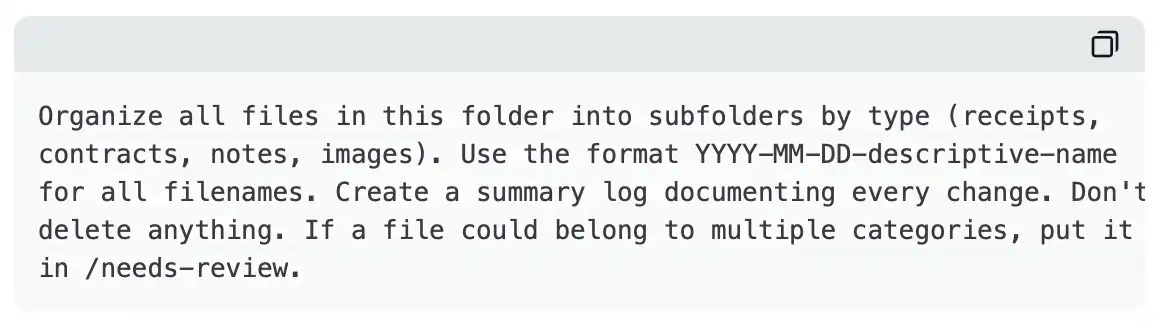
Claude will read each file, categorize them, rename them by date, establish a file structure, and generate an operation log. A task that originally took 2 hours for organization can be compressed to 10 minutes.
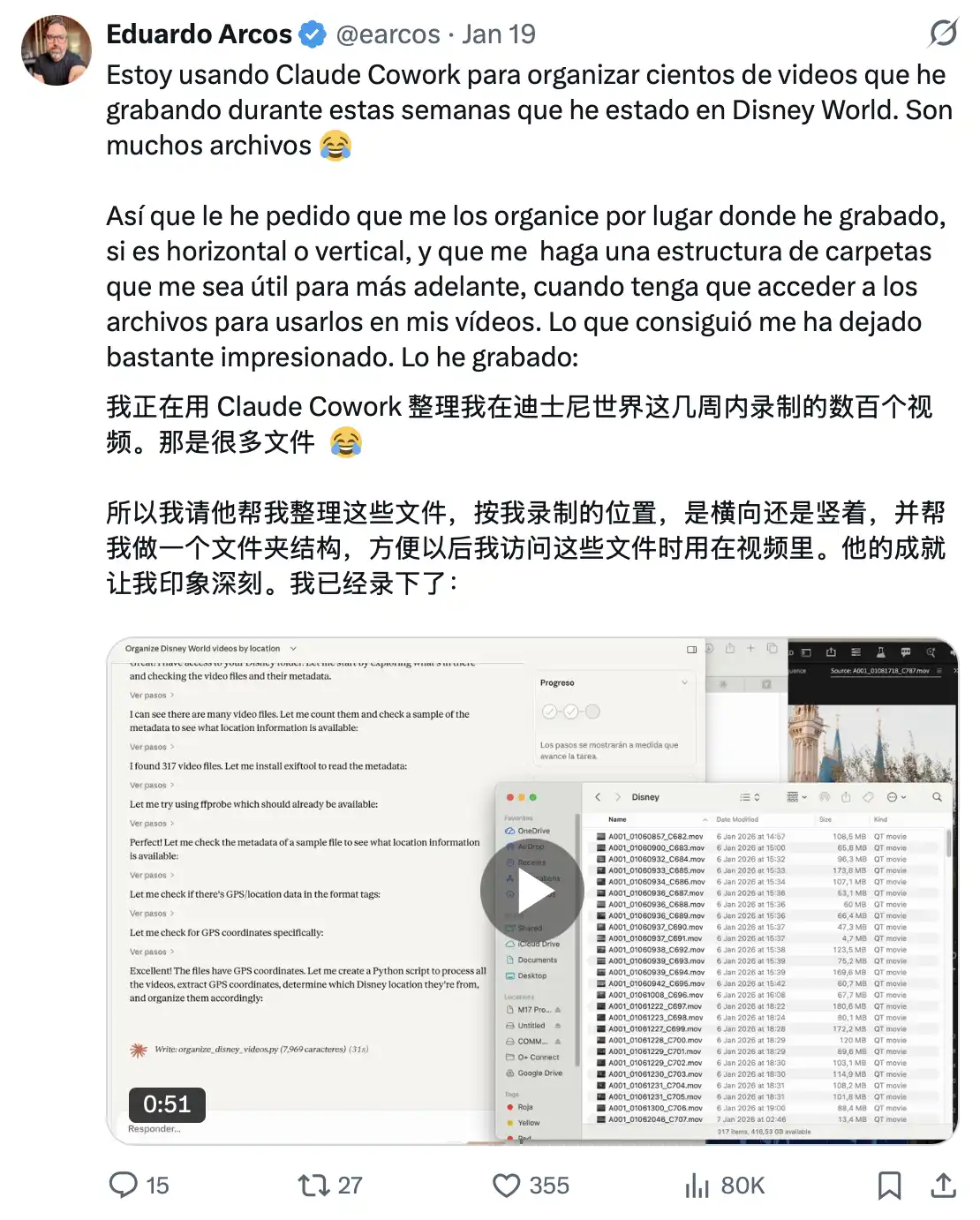
A user used Cowork to organize 317 videos of Disney World: Claude extracted GPS coordinates from the video metadata, determined the park location for each video, and automatically sorted them into different folders based on this information.
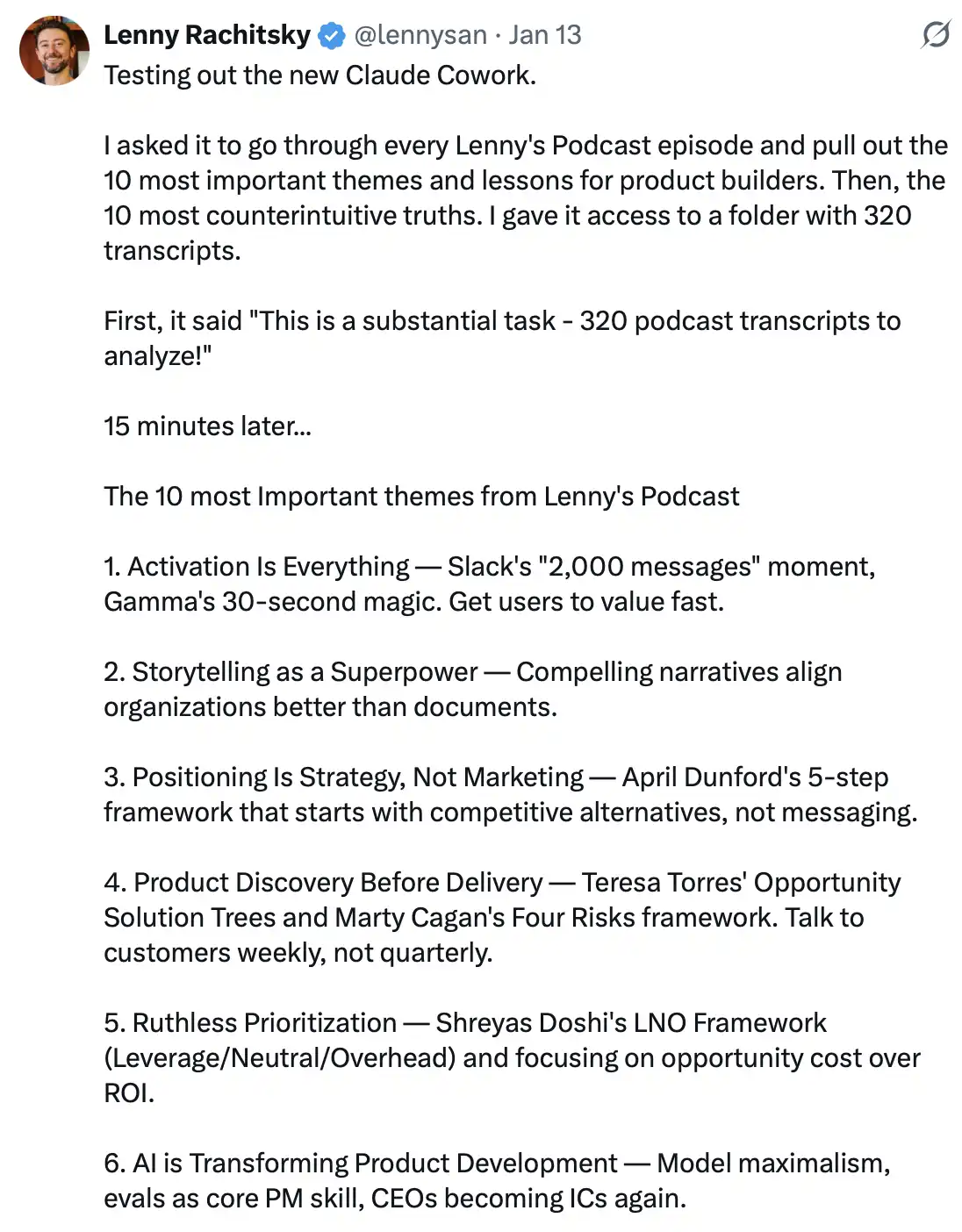
Lenny had it go through all of its podcast content (hundreds of episodes) and automatically extracted key information, such as "most important product experience" and "most counterintuitive insight." The entire process was completed in minutes, a task that previously could have taken days or even weeks. Related Reading
Turning raw materials into client deliverables: you have meeting notes, a verbatim transcript, and some research links on hand, and now you need to consolidate them into a structured, submission-ready report.
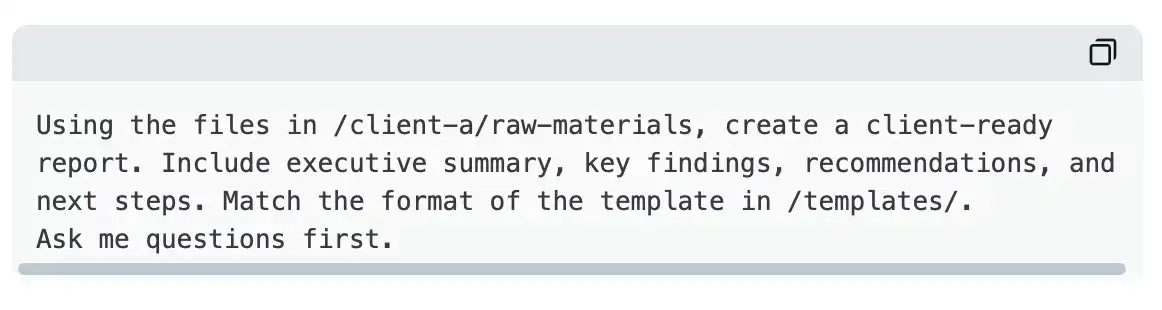
Claude will read all your source material, consolidate it into a structured report, complete formatting based on your template, and save it directly as a sendable version. What used to take 90 minutes can now be compressed into 15 minutes.
Automated Weekly Research Brief: You can set up a scheduled task for competitive intelligence. Every Monday morning at 7 a.m., Cowork will automatically research competitors, scan industry publications, and generate a formatted brief. You only need to review it at your convenience. With connectors, you can also pull real-time data from Slack, Gmail, and Drive.
Financial Modeling: An author once had Cowork build a social media exit valuation model. Claude will develop the plan, uncover formula errors, and correct them on its own, ultimately delivering a "Wall Street-style" Excel file containing four valuation methods and a total of 129 formulas. Comprehensive valuation range coverage: revenue multiples, EBITDA multiples, user/subscriber value, and a 5-year DCF model. Frankly, this is already quite amazing.
Limitations
Cowork consumes credits quickly.
A single complex task can consume credits equivalent to several dozen normal conversations. Under the Pro ($20/month) plan, if you use it every day, you usually hit the limit within a week. Community feedback indicates that heavy users hit the rate limit in 3–4 days, which can significantly impact the experience, especially during critical task stages.
Multi-step tasks (such as file reading, document generation, and parallel subtasks) are inherently compute-intensive. If Cowork becomes your primary workflow, Max ($100/month, which offers about 5 times the credits; or $200/month, which offers about 20 times the credits) is more feasible. It is recommended to monitor usage in real-time through Settings > Usage to avoid interruptions midway through tasks.
The context compression issue in long sessions is also significant. When a session approaches the context limit, Claude will automatically compress early content summaries to free up space. Although it keeps the session running, the cost is a decrease in information accuracy: numbers are simplified, file references become vague, and early decisions are compressed into summary descriptions.
If you notice Claude starting to respond with "common patterns" instead of specific references, it indicates compression has occurred. The solution is to have Claude write critical information to a file at key points. This way, even if the context is compressed, crucial information is still traceable.
Currently still in the research preview stage. Anthropic also explicitly states: Models may still misread files or take unnecessarily complex paths on simple questions. In complex multi-step tasks, there is about a 10% chance of deviation from the expected execution path, and there may be local inconsistencies in the final result. Therefore, manual review is required before external output.
Sessionless. Each new Cowork session is completely independent: it doesn't remember who you are or what was discussed yesterday. This is currently the biggest friction point.
However, once you establish a context file system, this issue can be effectively mitigated:
· Preferences written to file
· Project plans written to document
· Standards written to directive
If continuity is needed, then "write to file" that continuity. The opposite advantage is also clear: a structured workflow with portability, shareability, and version control capabilities.
Task depends on client runtime. Cowork is an activity session running in Claude Desktop. Once the window is closed, the task is interrupted. It is recommended to let your computer sleep instead of closing the application so the session can be preserved.
Only desktop support. There is currently no mobile Cowork or browser version, no support for cross-device synchronization (Dispatch can partially compensate, but not entirely replace it). It is recommended to place context files in a cloud sync directory (such as iCloud, Dropbox, OneDrive) to ensure file consistency across different devices.
How to Use Claude Code Effectively: Developer-Centric
If Cowork is targeted at knowledge workers, then Claude Code is aimed at developers.
Claude Code was initially launched in February 2025 as a command-line coding tool and has now evolved into an extensible platform used to schedule AI Agents throughout the development process, with an annual revenue of $25 billion.
Installation is very simple: install via npm (npm install -g @anthropic-ai/claude-code), enter the project directory, type claude, and you can start an Agent with access to the entire codebase.
Its operations include: reading files, writing files, executing commands, internet searches, running tests, and code submission.
Meanwhile, the web version of claude.ai also underwent a significant upgrade in February, introducing multi-repository sessions, enhanced diff and Git status visualization, and slash command support. However, its deepest capabilities still reside in the terminal version.
But what truly sets it apart is not the act of "writing code" itself. It is the extension of its capabilities, transforming Claude Code from an enhanced autocomplete tool into a configurable development platform.
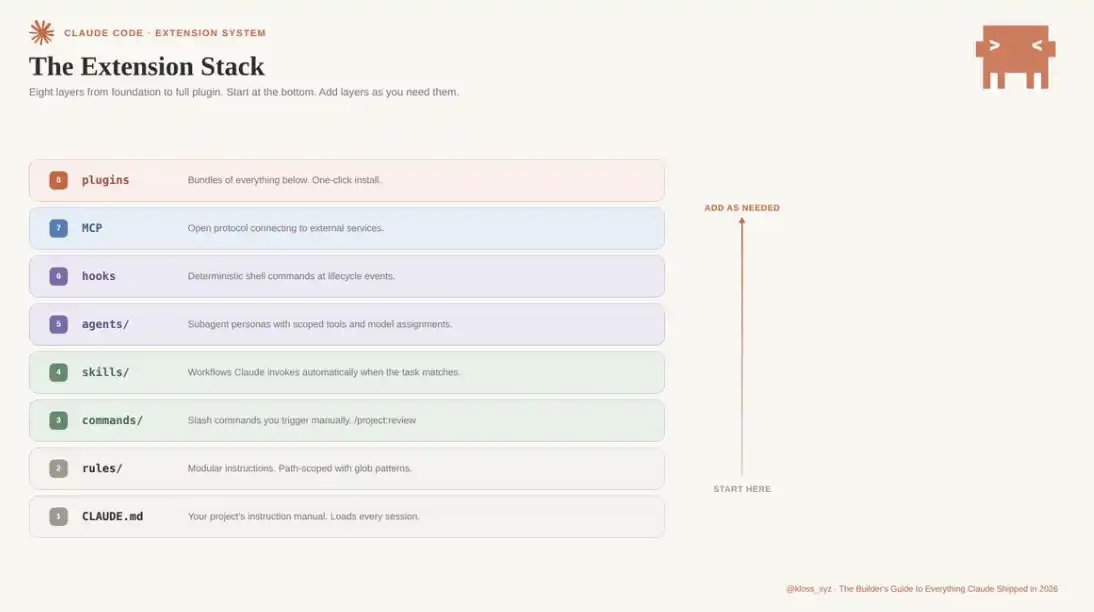
How to Set Up an "Environment"? Three Key Steps
1. CLAUDE.md: Project-Level Instruction Manual
At the beginning of each session, Claude first reads your CLAUDE.md. It is directly loaded into the system prompt and remains effective throughout the entire conversation. Claude will adhere to what you write here. However, most people either completely ignore it or stuff it with a lot of invalid information, resulting in a decrease in output quality. Too little or too much information can have negative effects—this is a "threshold" that needs to be mastered.
What to Include
Focus on content that truly impacts execution quality:
· Key commands such as build, test, lint, etc. (specific bash commands)
· Core architectural decisions (e.g., "Adopting Turborepo's monorepo architecture")
· Non-obvious constraints (e.g., "TypeScript strict mode enabled, unused variables will throw errors")
· Import standards, naming conventions, error-handling styles
· File and directory structure of core modules
What Not to Include
· Content that should be in linter or formatter configurations
· Comprehensive documentation with existing links for reference
· Lengthy theoretical explanations
It is recommended to keep it under 200 lines. Exceeding this length will occupy too much context, weakening Claude's ability to follow instructions because it has to "compete for attention" between your instructions and Claude Code's own system prompts.
Not Just "What to Do," But Also "Why"
Using TypeScript strict mode is a basic requirement, but using strict mode because we have experienced online bugs due to implicit any types would be more effective. The reason is that "why" provides context for judgment, allowing Claude to make more informed decisions in scenarios that are not explicitly covered.
Continuous Updates Instead of One-Time Write-up
While working, press "#", and Claude will automatically add the new rule to CLAUDE.md. When you find yourself correcting the same issue for the second time, that's a signal that this rule should be written down. Over time, it will evolve into a "living document" that truly reflects how the codebase operates.
The Difference Between Good and Bad
A bad CLAUDE.md is like an onboarding document for newcomers; a good CLAUDE.md is more like a work memo you leave for yourself before losing your memory.
2. Hierarchical Structure of CLAUDE.md
Many people overlook this: CLAUDE.md is not a single file but a hierarchical structure that takes effect when the session starts.
Managed Policy (Organizational level)
IT deployment, unalterable, applies to company-wide rules
~/.claude/CLAUDE.md (Global level)
Personal preference configuration, effective across projects, not version-controlled
./CLAUDE.md (Project level)
Team-shared configuration, committed to Git, universally effective for all members
CLAUDE.local.md (Local Overrides)
Personal adjustments for the current project, automatically ignored in commits
When rules conflict, the higher-level takes precedence. This hierarchical structure allows Claude Code to expand from a "personal tool" to a "team collaboration system."
A Common Team Issue
Developers write key rules in their personal configuration (~/.claude/CLAUDE.md), making everything work fine for them. However, when a new member clones the repository, the lack of these personal configurations causes disparate outputs. The team often mistakenly attributes this to a model problem when it is actually a configuration issue.
A typical example is: the team spent two days debugging "Claude's random behavior," only to find out in the end that the core rule existed only in the local configuration of a senior developer. The conclusion is simple: all team standards must be written in the project-level CLAUDE.md.
3. Rules Directory: Extensible Modular Instruction System
When CLAUDE.md becomes unwieldy (as it inevitably does), you can split the rules into the .claude/rules/ directory.
Each Markdown file in this directory will be loaded together with CLAUDE.md at the start of a session. This modularizes the instruction system, allowing for scalable extensions while keeping the main file concise and maintainable.
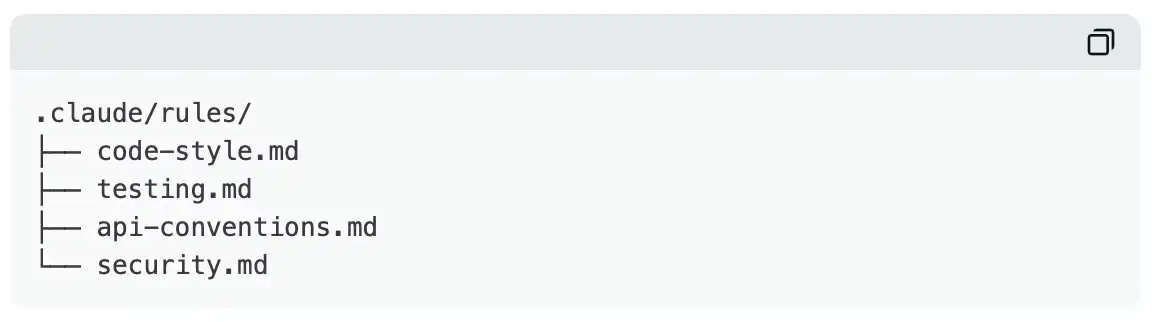
Each file can remain focused. The person in charge of API specifications maintains api-conventions.md, the person in charge of testing maintains testing.md, with clear responsibilities that do not interfere with each other.
What truly adds value is the "path-scoped rules." By adding YAML front matter with glob patterns in a file, you can make these rules effective only when Claude processes files matching the specified path:
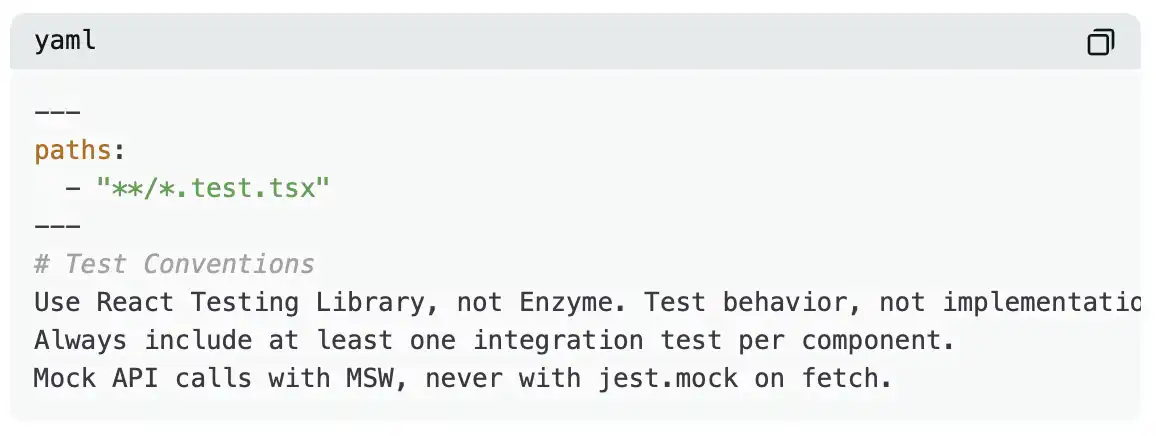
This can cover all test files, regardless of their directory location. In contrast, directory-level CLAUDE.md only applies to files within that directory. For standards that need to be uniformly enforced across over 50 test directories, path-based rules are a more reasonable solution. Additionally, this approach can reduce token consumption because relevant rules are only loaded when matched.
Differences Between Commands, Skills, and Agents
These three types of extension mechanisms work differently. If chosen inappropriately for a particular use case, they may instead increase usage costs and friction.
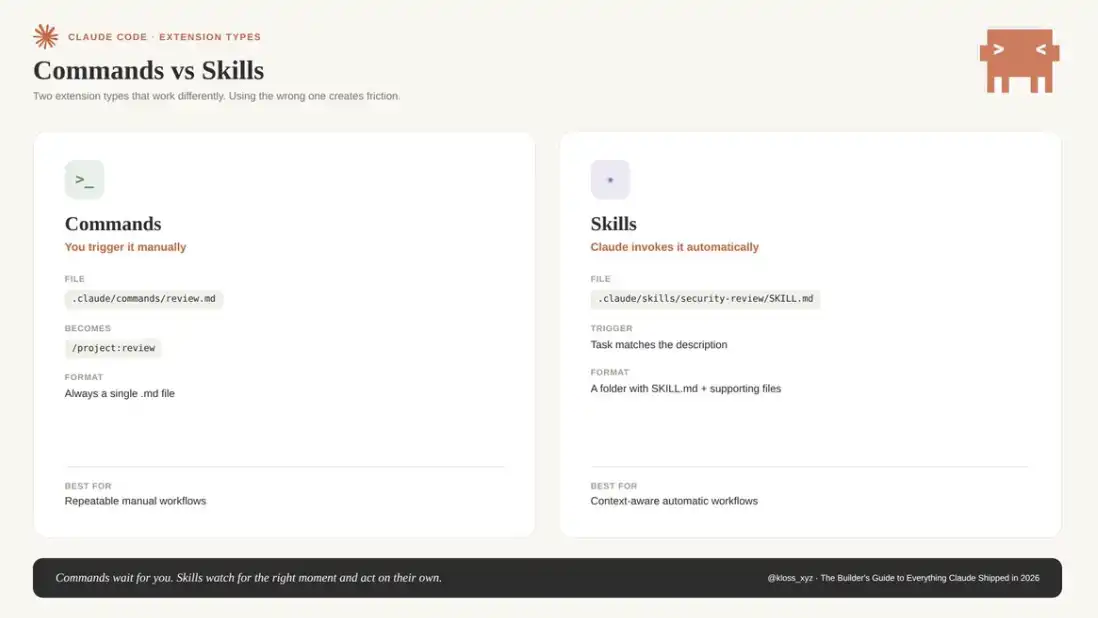
Commands (.claude/commands/) are slash commands that need to be manually triggered.
For example, a file named review.md corresponds to a command /project:review. You can write instructions in Markdown within the file; simultaneously, using the ! backtick syntax, you can first execute shell commands and embed the output result before the prompt in Claude.
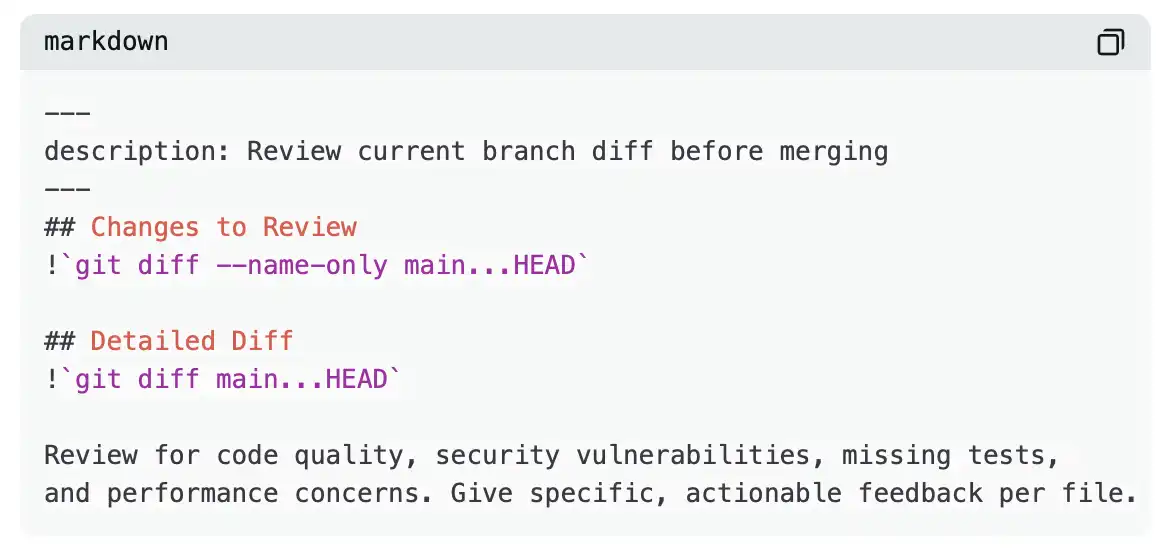
Now, when running /project:review, the system will automatically inject the actual git diff into the prompt.
You can also use $ARGUMENTS to pass parameters, for example: /project:fix-issue 234 will directly load the content of issue number 234 into the context.
Project-level commands (.claude/commands/) will be committed and shared within the team; personal commands (~/.claude/commands/) will appear in the form of /user:command-name and will only be visible to the individual.
Skills (.claude/skills/), on the other hand, are a different mechanism: they are not manually triggered but are automatically invoked by Claude when tasks match.
You don't need to input any slash commands. Claude will read the skill description, determine if the current task matches, and automatically trigger at the appropriate time.
In other words:
· Commands are "waiting for you to trigger"
· Skills are "automatically executed after recognizing the scenario"
In structure, Skills are a folder, not a single file. It can contain scripts, reference documents, data, and templates. A SKILL.md file with a YAML front matter configuration can define its triggering conditions:
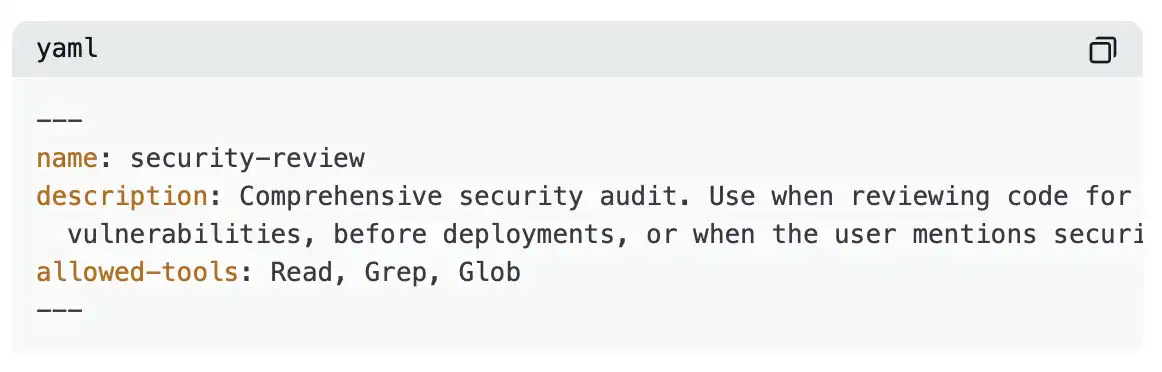
Skills now also support setting an effort parameter in the YAML front matter, which can override the model's default reasoning intensity when called. They also support on-demand triggering hooks that only take effect when that skill is invoked. For example: /careful is used to prevent destructive operations, and /freeze is used to restrict editing beyond a specific directory.
The Anthropic internal engineering team has built hundreds of skills in nine major scenario categories, including: library/API reference, product validation, data retrieval, business process automation, code scaffolding, code quality review, CI/CD deployment, runbooks, and infrastructure operations.
On March 7, they also open-sourced 17 of these skills to GitHub (anthropics/skills), covering scenarios such as creative design, document generation, technical development, and corporate communication.
The most valuable part of a skill is often the "gotchas" summary—those pitfalls you've experienced firsthand. Prioritize including these experiences as they hold the most value.
Agents (.claude/agents/) are a further abstraction: they are "sub-agent roles" with independent system prompts, tool permissions, and model preferences.
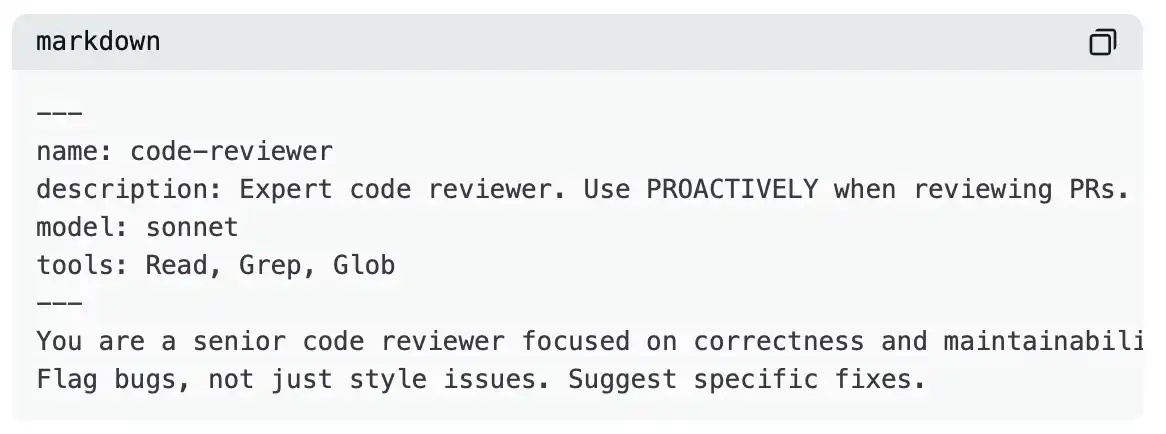
The tools field is used to constrain an agent's capabilities. For example, a security audit agent may only be granted Read, Grep, and Glob permissions, without write capabilities—this is a deliberate constraint. The model field allows selecting a lower-cost model for different tasks. For tasks primarily focused on reading and exploration, Haiku is usually sufficient.
The core value of subagents lies in maintaining the cleanliness of the main context. The main agent's context window is easily filled with a vast amount of exploratory information; whereas subagents handle this "dirty work" in an independent context and then return the compressed results. Ultimately, the main dialogue retains conclusions rather than the entire reasoning process.
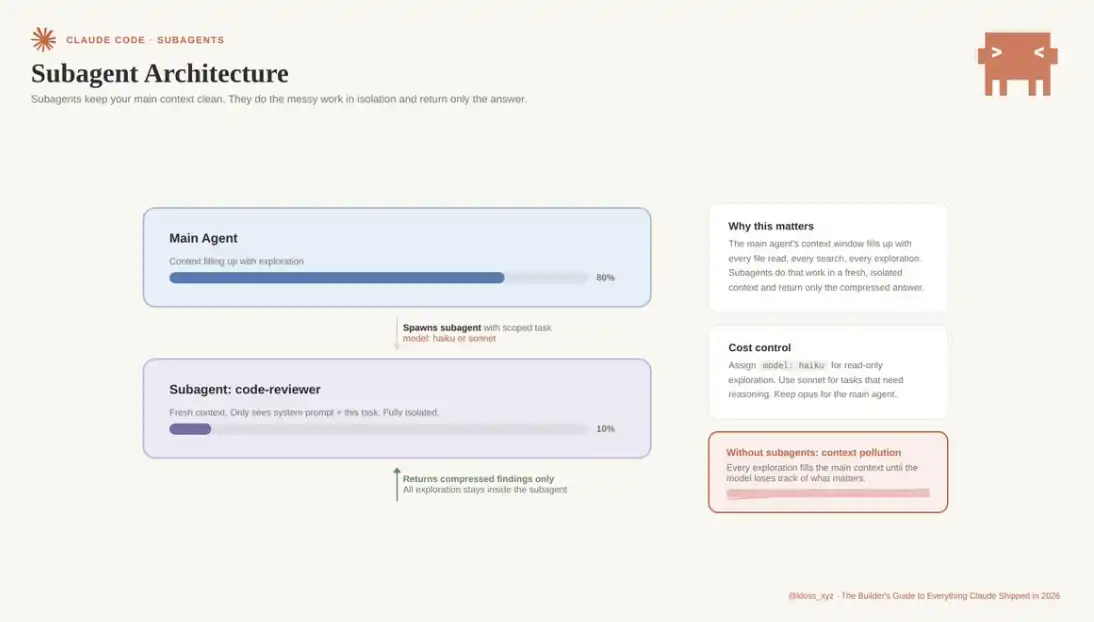
Claude Code Core Features
Tasks
Launch Date: January 22nd.
Anthropic upgraded the existing Todos system to Tasks, turning it into a true project management foundational component.
Tasks support dependencies, store data in the local file system (~/.claude/tasks), and allow multiple subagents or sessions to collaborate on the same task list. When a session updates a task, the changes are synchronously broadcast to all sessions using that task list.
You can also set the task list as an environment variable, launch multiple parallel agents, and collaborate through the same task system. This forms the basis of a multi-session workflow and is a core mechanism for Agent Teams to maintain organizational order.
Agent Teams
Launch Date: February 5th, released with Opus 4.6, currently an experimental feature.
If subagents represent a "separate execution, unified reporting" mode, Agent Teams are more like a collaborative team. Team members can directly communicate with each other through an inbox-like mechanism, split tasks through a shared task list (with dependencies), and achieve parallel collaboration.
Support up to 10 members running simultaneously. A main session is responsible for overall coordination: task assignment, result integration; each member executes tasks in their own independent context window.
Unlike subagents, team members can:
· Directly share discoveries
· Verify and question each other
· Collaborate without the need for central session redirection
Activation method: Set in settings.json
CLAUDE_CODE_EXPERIMENTAL_AGENT_TEAMS=1
Typical Use Case
For example, you need to develop a new feature involving: API, front-end components, and testing framework.
You can start with three members:
· One responsible for the API interface
· One responsible for React components
· One responsible for integration testing
The three collaborate by sharing a task list, and the testing member can instantly know which interfaces and components need validation. The overall workflow shifts from sequential execution to parallel progression: a task that originally required 90 minutes can be completed in about 30 minutes.
Usage Boundaries
Agent Teams will incur additional coordination costs, while token consumption is significantly higher than a single session.
Applicable to:
· Tasks that can be decomposed in parallel
· Relatively independent subtasks
Not applicable to:
· Tasks strongly dependent on order
· Scenarios requiring frequent modifications to the same file
In these cases, it is recommended to prioritize using a single session or subagents.
Remote Control
Release Date: February 24 (Initially available to Max users, later expanded to Pro).
This was the solution before Channels.
Run claude rc in the terminal, then take over the session on your mobile device (Claude App or claude.ai) to achieve remote control:
You can start tasks on your desktop, then continue to direct the execution process via your phone after you leave.
Although Channels (below) have expanded the use cases by integrating with Telegram and Discord, Remote Control is still the simplest way to achieve "mobile-controlled terminal" without the need for additional configuration of a message bot.
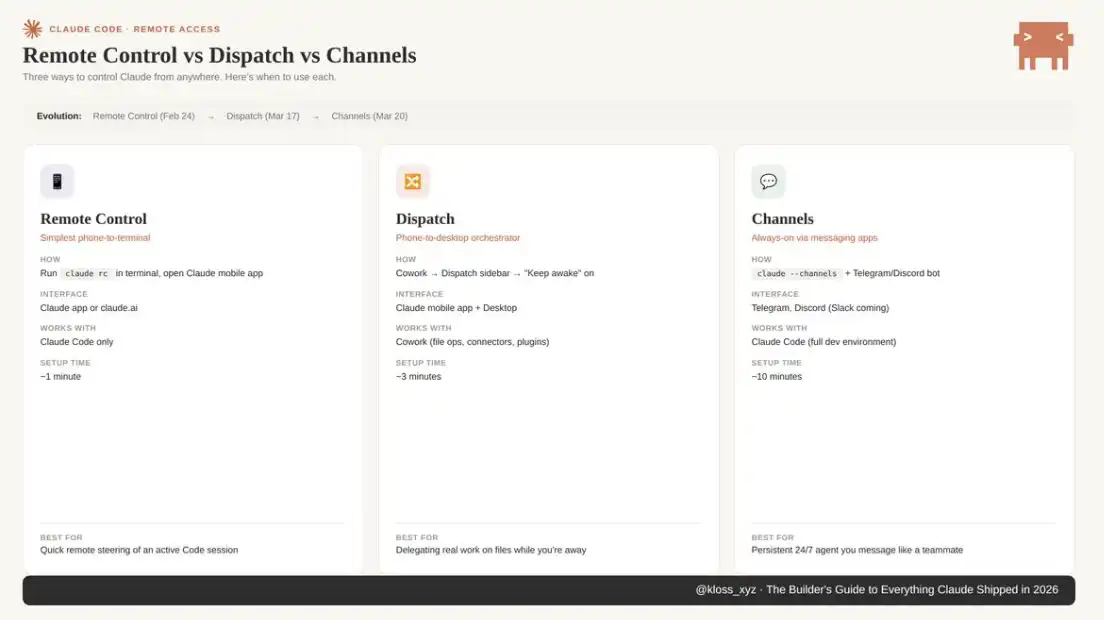
Claude Code Channels: Always-on Message Interface
Live Since: March 20, currently in research preview.
If you have ever wanted to be able to directly message an AI from your phone and have it perform tasks on your local machine, then this is the corresponding solution.
Channels can connect a running Claude Code session to Telegram or Discord. Simply send a message on your phone, and Claude will process the command in your local development environment (including files, tools, Git, and all resources) and return the result through the same chat app.
Your session will continue running in the background. External events keep coming in, and Claude processes them one by one in the full project context. Whether you are staring at the terminal during execution is no longer important.
This interactive mode is the reason for the rapid rise in popularity after the November 2025 release of OpenClaw: an "always-on AI work node" that can be called 24/7 through commonly used chat tools.
The difference is that Channels are a native capability of Claude Code, backed by Anthropic's security system, and built on the MCP architecture with good scalability.
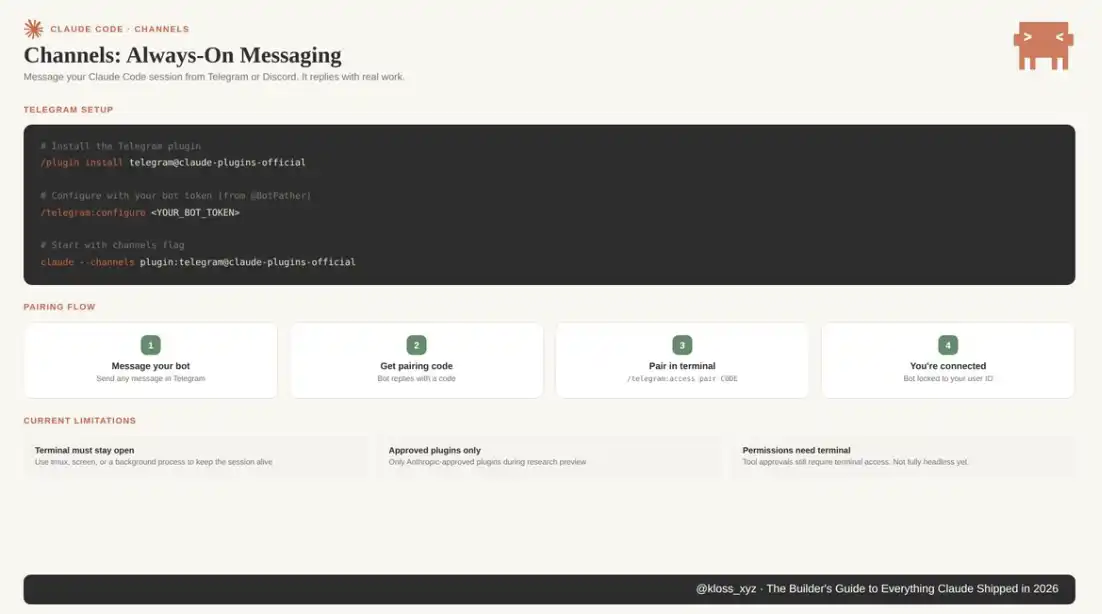
Configuration:
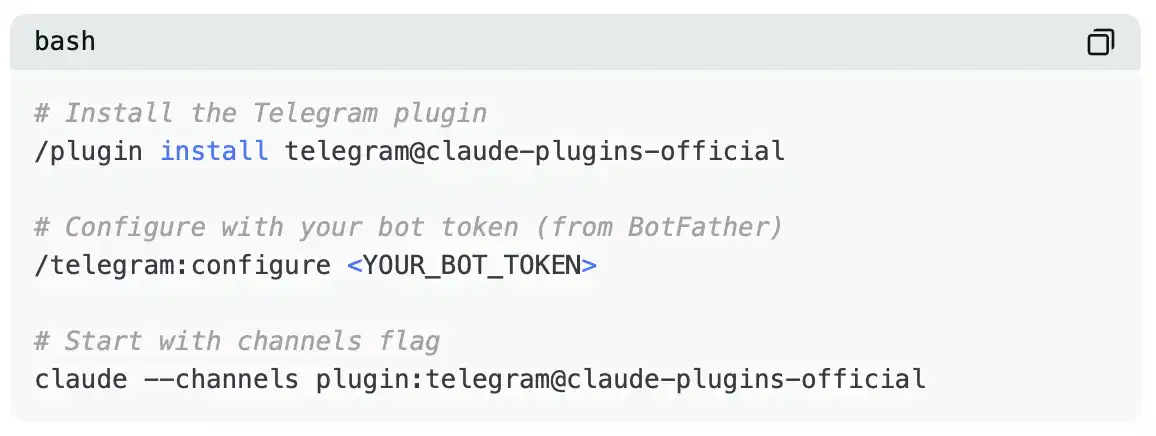
Open Telegram, send any message to your bot, and it will return a pairing code. Complete the pairing using /telegram:access pair <code>. The pairing process will lock the bot to your user ID to ensure that no one else can control your session.
Discord's integration is similar, completed through the corresponding plugin.
Current limitations include:
· The need to keep the terminal session running continuously (can be combined with tmux, screen, or a background process)
·During the research preview phase, only plugins officially approved by Anthropic are supported
·Permission confirmation still needs to be completed in the terminal
However, the plugin architecture itself is designed for extensibility. Channels such as Slack, WhatsApp, iMessage have already seen widespread demand, and development documentation for custom channels has also been made public.
The entire Channels setup process takes about 10 minutes: create a Telegram bot, get the pairing code, and complete the binding. After that, you can operate a local Claude Code session directly from your phone while on the go. For example, I once had it refactor an authentication flow while buying coffee; by the time I was back at my desk, the PR was ready for direct review.
At that moment, it no longer felt like a tool but more like an infrastructure layer.
Hooks
Hooks are shell commands that are automatically triggered at specific lifecycle points, such as pre-commit, post-tool-call, or when Claude attempts to edit a specific file.
They are not concerned with the AI's "intelligence" but with deterministic control capabilities.
Typical applications include:
· Automatically running lint on each file Claude writes to
· Preventing files containing sensitive information from being committed
· Sending Slack notifications after a task is completed
· Automatically running type checks after each edit
· Enforcing compliance with rules that must be 100% followed
For example, the following is a basic Hook configuration to prevent Claude from committing sensitive information:
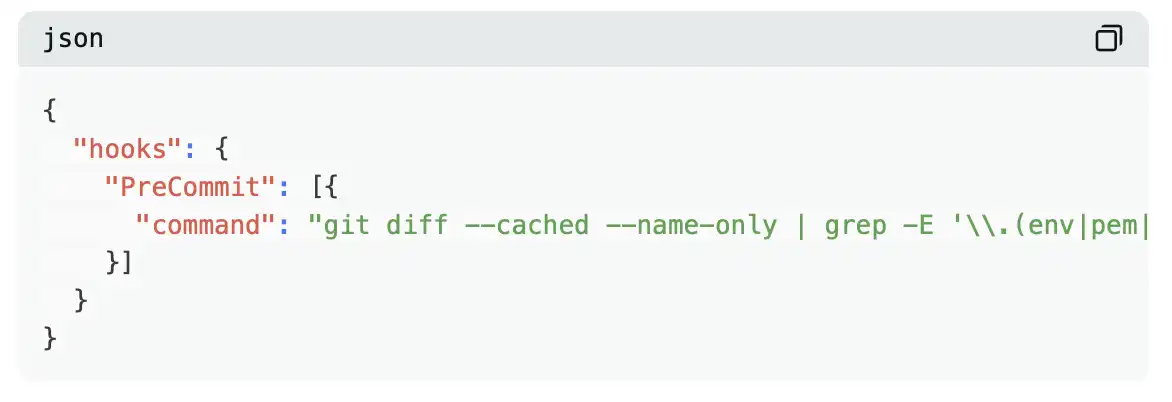
After adding this configuration to .claude/settings.json, sensitive information can be intercepted before it enters the repository, achieving proactive protection of sensitive information, no longer relying on model inference, but providing deterministic assurance.
Recent additions also include PostCompact hooks (triggered after context compression to record the compressed content) and ExitWorktree hooks.
A clear decision framework is: Hooks provide deterministic assurance and should be used for business rules that must be executed correctly 100% of the time; prompts, on the other hand, are probabilistic guidance suitable for preferences and soft constraints.
If a single failure could result in financial loss or legal risk, prioritize using Hooks.
MCP
MCP is an open standard that connects Claude to external services, covering databases, APIs, GitHub, Slack, Telegram, Google Drive, and almost any system that can build a server-side API.
You can think of MCP as the "USB-C port" of the AI era: you no longer need to develop integrations for each data source separately but instead universally interface through a protocol.
· MCP Server: Provides data and capabilities
· Claude: Acts as the client interface
The entire Channels feature is built on MCP, and the integration of Telegram and Discord essentially functions as an MCP Server, with the plugin architecture also operating within this system.
In other words, if you are building any system involving "Claude + external data," you are essentially using MCP.
MCP configurations are usually located at:
Project Level: .mcp.json (included in version control, team-shared)
Personal Level: ~/.claude.json
By using environment variables (such as ${GITHUB_TOKEN}), you can avoid storing credentials in the repository.
Prior to setting up a self-hosted MCP Server, first check if there are existing community implementations. Common tools like Jira, GitHub, Slack, Notion, Linear, etc., already have ready-made solutions. Only when community solutions cannot meet specific team requirements is it advisable to self-host.
It is recommended to regularly run /mcp to check the token consumption of each service. In actual cases, some projects have had around 15% of their context window occupied by legacy connections. Unused services should be disconnected promptly.
Plugins
Plugins are the core vessel of team standardization. A team member can encapsulate code review standards, deployment processes, and architectural specifications as plugins. Once the team uniformly installs these plugins, output consistency, style uniformity, and process compliance can be achieved. Standards no longer rely on individual memory but are solidified as system capabilities.
Plugins are essentially a composite unit: packaging skills, hooks, subagents, and the MCP server into an installable module.
For example, a complete code review process (including skill, subagent, and pre-commit hook) can be encapsulated as a plugin and distributed through a marketplace or team private repository.
The skills in the plugin use namespaces (e.g., /my-plugin:review) to avoid conflicts between multiple plugins. The March 20 update also supports declaring the plugin entry point in settings.json using source: 'settings'.
Recommended path:
· Install an official plugin that matches your role
· Use it in practice for a week
· Build a custom plugin encapsulating team standards
The real efficiency gain occurs in the third step.
Headless Mode and CI/CD
Claude Code supports running in non-interactive mode via the -p parameter, allowing seamless integration into automation processes such as PR code review, security scans, test generation, and documentation updates. If this parameter is not used, CI tasks will block due to waiting for interactive input.
Combining:
--output-format json
--json-schema
can output structured results for automated system parsing and generating PR comments.
A basic GitHub Actions workflow would be:
· Triggered on PR creation
· Execute: claude -p "review this diff..."
· Output JSON
· Parse and post comments
Deployment takes about 15 minutes and can help identify issues before manual review.
Key principle: Code review should use an independent Claude instance, not the same session that generated the code. The reason is that the session that generated the code retains its reasoning path, making it less prone to self-challenge decisions; an independent instance makes it easier to identify issues.
Claude Code Security Capability
Claude Code is capable of performing a security audit on the entire codebase. Traditional scanning tools rely on rule matching, with a false positive rate usually ranging from 30% to 60%; Claude, on the other hand, performs cross-file data flow analysis through semantic understanding and can identify complex logic vulnerabilities.
Anthropic reports a false positive rate of less than 5%. In testing for Opus 4.6, its security team discovered over 500 vulnerabilities in multiple mature open-source projects, some of which had been present for years without being identified. Subsequently, Claude will perform a secondary screening of the results using a red team mechanism to further reduce false positives.
Voice Mode
Claude Code supports voice input, enabling keyboard-free programming.
Typical use cases include: viewing code while dictating refactoring logic, verbally describing solutions to complex problems while thinking, activated via /voice.
Despite early issues such as WebSocket disconnection, continuous optimizations have been made.
Automated Code Review and PR Workflow
Claude Code can automatically perform code reviews in PRs: analyzing the diff, evaluating code quality, flagging potential issues, checking test coverage, and providing comments within the PR.
When combined with CI/CD, it can also: generate previews, run tests, summarize changes, and prepare for merge when conditions are met.
Outside of Chat, Cowork, and Code, the ecosystem continues to expand.
How to Use Claude in Excel and PowerPoint
Claude is now integrated into Excel and PowerPoint as a plugin.
The update on March 11 achieved context sharing between the two: data analysis done in Excel (such as formulas, pivot tables, conditional formatting, etc.) can seamlessly transition to PowerPoint to create presentation content and visual results without losing information.
Skills can also run within the plugin; additionally, enterprise users based on Amazon Bedrock, Google Cloud Vertex AI, or Microsoft Foundry can also access through the LLM Gateway.
The most efficient workflow is to import raw data into Excel, allow Claude to perform analysis, build pivot tables, and extract key trends, then open PowerPoint and have Claude directly generate presentations based on these analysis results.
With the context already shared, Claude has mastered the data, key insights, and crucial numbers—no need to repeat, no need to copy-paste across applications, and no need to reformat.
Creators have provided feedback that from raw quarterly data to board-level reporting, it now only takes about 20 minutes.
Microsoft also launched "Copilot Cowork" based on the Claude model on March 9 as part of its $99/user E7 enterprise subscription.
Claude is gradually becoming the underlying capability engine for other enterprise products.
Custom Visuals in Chat
Launch Date: March 12 (Beta), available to all users, including free users.
Claude can now directly generate interactive charts, diagrams, and visual content within chats.
These visuals are built using HTML and SVG, support hover and click interactions, and can be continuously updated as the conversation progresses.
A distinction needs to be made:
Inline Visuals: Temporary, dynamically changing within the chat
Artifacts: Persistent, shareable documents (located in the sidebar)
Inline Visuals are more like temporarily "doodling on a whiteboard" during a discussion. You can export them as SVG/HTML or convert them to Artifacts for preservation.
Usage recommendations:
Prioritize Inline Visuals when exploring data or explaining concepts
Use Artifacts when delivering outcomes
A typical scenario is: in the midst of debugging, saying, "Help me draw an authentication flowchart."
Claude instantly generates the diagram, allowing you to address the issue and continue the discussion without switching tools.
Some Core Changes
API
For developers building applications based on Claude, the most critical current changes include:
Inference Mechanism Adjustment
Adaptive inference effort replaces the original budget_tokens model.
Sonnet 4.6: Set to "medium" to reduce cost without significantly affecting quality
Opus 4.6: Added "max" mode for high-performance scenarios, but with a significant increase in token consumption
Inference tokens are billed per output token (Opus at $25/M), making effort a key cost control parameter in the automated process.
Tooling & Output Capabilities Generally Available
Fine-grained tool streaming invocation is now officially available
Structured outputs have reached GA
Data residency support (limiting inference to the US at 1.1x the cost)
1M context window is now automatic (no additional configuration needed for over 200K tokens)
Web Capabilities
Code execution is free when combined with web search or web fetch
Search results support dynamic filtering (at no extra cost)
Both web search and web fetch are now GA with no beta label
This is a key capability that is often overlooked by most developers.
API Skills
API Skills are a new capability that has not yet been widely adopted.
Anthropic has provided pre-built skills for PowerPoint, Excel, Word, and PDF processing;
also supports uploading custom skills through the /v1/skills interface, encapsulating domain knowledge and organizational processes into reusable capabilities.
It is important to note:
Skills rely on code execution capability being enabled.
For document processing applications, this capability can replace a large number of custom toolchains.
Context Compaction
When a session approaches the context limit, the system will automatically compress and summarize historical content, freeing up space while retaining key information.
With the official availability of the 1M context window, the compression trigger frequency has significantly decreased.
Data and Scale
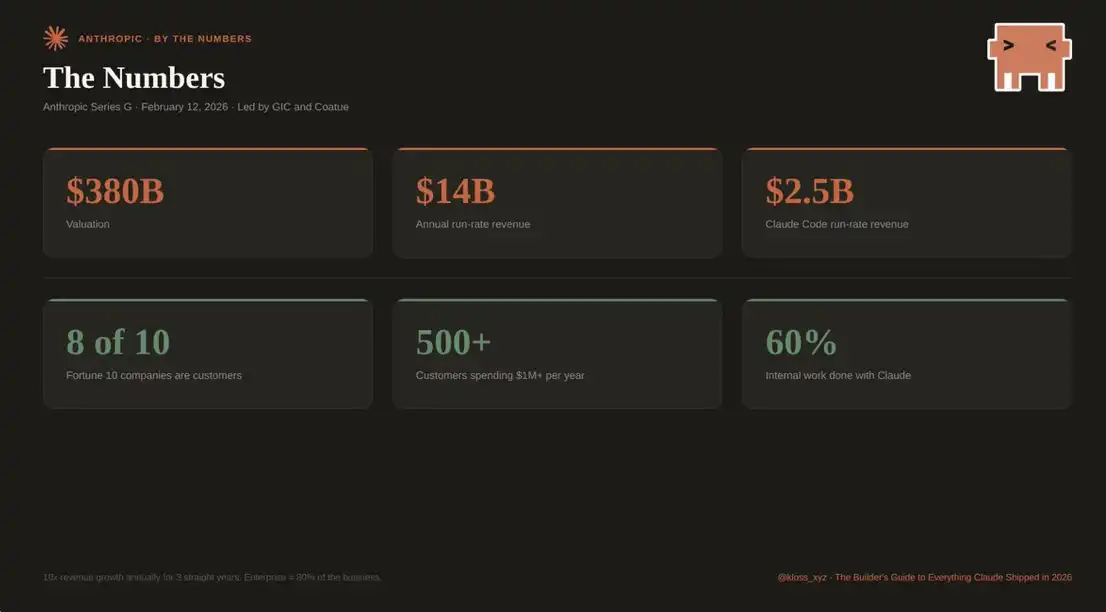
Anthropic completed a widely reported $30 billion Series G funding round on February 12, 2026, valuing the company at $380 billion. This round was led by GIC and Coatue and is the second-largest VC deal in history, only behind OpenAI's $40 billion raise. Microsoft and NVIDIA also participated.
The company's annual revenue has reached $14 billion, achieving 10x growth for three consecutive years. Specifically, Claude Code's annual revenue has reached $2.5 billion, more than doubling since the beginning of this year. Meanwhile, enterprise subscription scale has quadrupled.
In terms of customer structure:
· 8 out of the top 10 Fortune 500 companies are Claude customers
· The number of customers spending over $1 million annually has exceeded 500 (up from just over a dozen two years ago)
· The number of customers spending over $100,000 annually has grown 7x in the past year
Currently, enterprise customers account for about 80% of revenue, and the enterprise edition supports online direct purchasing without traditional sales processes.
On the enterprise infrastructure front:
Launched an HIPAA-compliant Enterprise plan in January targeting organizations handling sensitive medical data
Released the Enterprise Analytics API on February 13, providing programmatic access to usage and engagement data at the organizational level
Such capabilities are key drivers of enterprise procurement decisions.
Anthropic also introduced the Claude Partner Network and allocated $100 million for training, joint marketing, and technical architecture support.
The first professional certification, Claude Certified Architect (Foundations), was launched on March 12, featuring a proctored architecture-level exam covering Agent design, MCP integration, Claude Code configuration, and production-level reliability patterns.
Accenture plans to train approximately 30,000 professionals through this certification system. The official training platform, Anthropic Academy, went live on March 2 with an initial offering of 13 free courses, now expanded to 15. More certifications for sales, developers, and senior architects will be launched later this year.
For consulting firms or agencies, this accreditation system is likely to become a key criterion for enterprise client partner selection in the future.
From an internal usage perspective:
· About 60% of Anthropic engineers' work depends on Claude (up from 28% a year ago)
· 60–100 internal versions are released daily
· Cowork went from 0 to live in just 10 days, entirely built on Claude Code
This has created a crucial feedback loop: tools are being used to build tools themselves.
It is this loop that has compressed the product iteration cycle from “monthly” to “weekly,” further down to “daily.”
What It Means If You're Building AI or an Agent
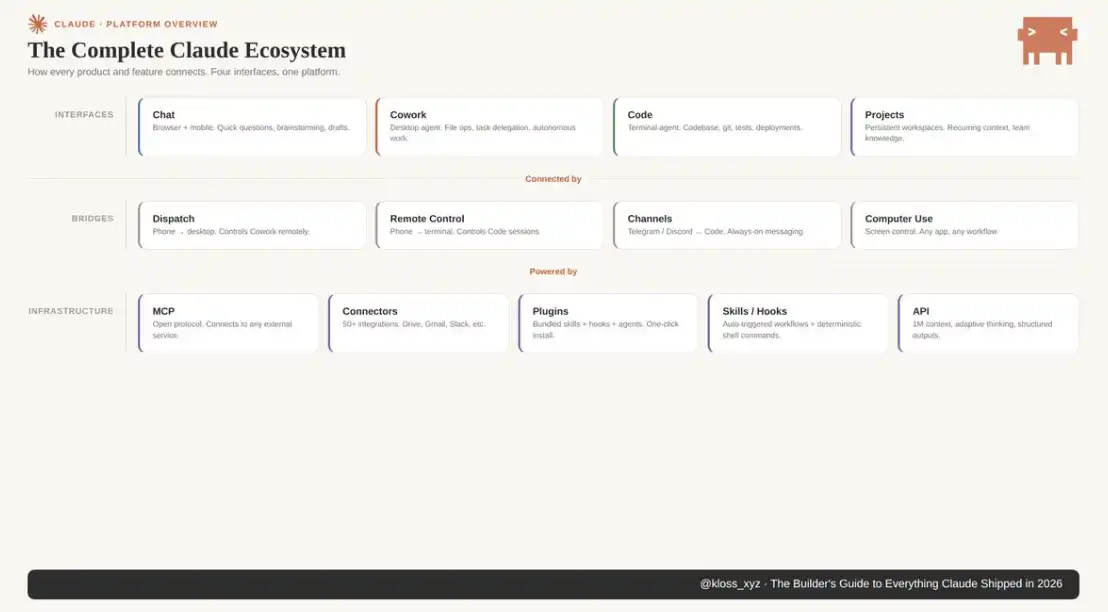
The infrastructure layer is rapidly ‘commoditizing.’ What was needed to be custom-built just six months ago is now a native capability of the platform. The real moat is never in the infrastructure; it’s in taste, distribution capability, and what you build on top of these tools.
For builders developing products on Claude, the real leverage is in its expansion system: Skills, Subagents, Agent Teams, Hooks, Channels, MCP, Plugins.
A Claude Code finely tuned with custom skills and scoped agents, versus a usage where you simply enter keywords in a chat box, are fundamentally two different tools.
Understanding these levels and configuring them to fit your workflow system will provide compounding benefits with every use.
For knowledge workers, Cowork will reshape your everyday work starting this week: set up a contextual file system, establish global commands, install two plugins, prioritize all tasks using AskUserQuestion, configure a scheduled task. Leverage Dispatch to bridge your phone and desktop, turning downtime into productive output; and Computer Use, the latest addition, further extends the boundaries of automation.
For team managers, the plugin marketplace and enterprise capabilities mean: you can standardize Claude's usage across the entire organization. Solidify the team’s experience, norms, and processes into plugins and distribute—this is the crucial leap from ‘occasionally using AI’ to ‘operating on AI’.
The pace will not slow down; it will only accelerate further.
Because Anthropic is using its own tools to build the next generation of tools. Each generation of models is improving the efficiency of building the next generation of models. This recursive acceleration is changing the way the entire industry computes.
Understand this platform now. Not next quarter, not next month, but now.
If you've read this far, you are ahead of 99.9% of people, those who will bookmark this content but are unlikely to come back to it. They will still use Claude as a basic chat tool, while you will not.
I'm not an engineer; I'm self-taught. I also don't claim to have all the answers or the best Claude configuration for all scenarios. If someone says that, they are likely misleading you. All the content here comes from daily practice—continuously trying, continuously stumbling, and documenting the truly effective methods so that others don't have to start from scratch.
What you need is: to be hands-on, to make mistakes, and even to "tinker" more. This is the only way to learn.
If you find inaccuracies, omissions, or outdated content here, please feel free to point them out—I'd rather correct it than have others continue to build on incorrect information.
Thank you for reading.
You may also like

Morning Report | CoinEx becomes a key hub for Iran to evade sanctions, involving over $3.8 billion in funds; Kalshi seeks a new round of financing, with a valuation potentially rising to $40 billion

From the white-haired stock god to the billionaire fund mogul, the smart people shorting Nvidia are all getting rich using the same framework

Why do cryptocurrency projects always like to change their names?

Global Launch: As predictions become the most scarce asset in the AI era, Manadia is defining the next generation of the value internet

Who is footing the bill for the $64 billion accounting frenzy?
I never expected that the first application of AI x Crypto would be in security auditing

What is your view on Binance's competitive advantages?

ETH has entered a non-consensus phase, and the turning point is approaching!
The shift in the cloud of the air: from despising stablecoins a year ago to the high-profile entry of capital today
The survival dilemma of small and medium exchanges behind the withdrawal anomalies exposed by AscendEX

Why Is Bitcoin Falling Below $60K? 5 Key Market Drivers Explained
Bitcoin has dropped sharply amid ETF outflows, Strategy stock weakness, AI stock rallies, and changing Fed expectations. Explore the key forces driving BTC’s latest correction and what traders should watch next.

Bitcoin vs. Gold in 2026: Which Asset Performs Better in Different Markets?

Morning News | The draft amendment to the People's Bank of China Law aims to clarify the legal status of digital renminbi; South Korea will transfer about 40 unregistered virtual asset service providers to law enforcement agencies
The cryptocurrency industry has entered the "Show Me" era: merely relying on vision is no longer enough

Interpreting the Ethereum Foundation's new structure: Reaffirming self-sovereignty amid institutional trends
Former SpaceX engineer reconstructs the financial execution system using first principles
Standard Chartered Bank sings a 50x rhapsody again, aiming for AAVE to reach 3500 USD

Tidal Investment: We still have a positive outlook on the AI industry chain, but the reasons have changed
Morning Report | CoinEx becomes a key hub for Iran to evade sanctions, involving over $3.8 billion in funds; Kalshi seeks a new round of financing, with a valuation potentially rising to $40 billion
From the white-haired stock god to the billionaire fund mogul, the smart people shorting Nvidia are all getting rich using the same framework
Why do cryptocurrency projects always like to change their names?
Global Launch: As predictions become the most scarce asset in the AI era, Manadia is defining the next generation of the value internet
Who is footing the bill for the $64 billion accounting frenzy?
I never expected that the first application of AI x Crypto would be in security auditing


